Python Interpreter
This component allows you to execute Python code with imported packages.
By default, code runs in the Langflow server process.
The Python Interpreter can only import packages that are already installed in your Langflow environment.
If you encounter an ImportError, install the package first. For more information, see Install custom dependencies.
On a shared server, isolate executions in a microVM or block the custom component.
Use the Python Interpreter in a flow
- To use this component in a flow, in the Global Imports field, add the packages you want to import as a comma-separated list, such as
math,pandas. At least one import is required. - In the Python Code field, enter the Python code you want to execute. Use
print()to see the output. - Optional: Enable Tool Mode, and then connect the Python Interpreter component to an Agent component as a tool.
For example, connect a Python Interpreter component and a Calculator component as tools for an Agent component, and then test how it chooses different tools to solve math problems.
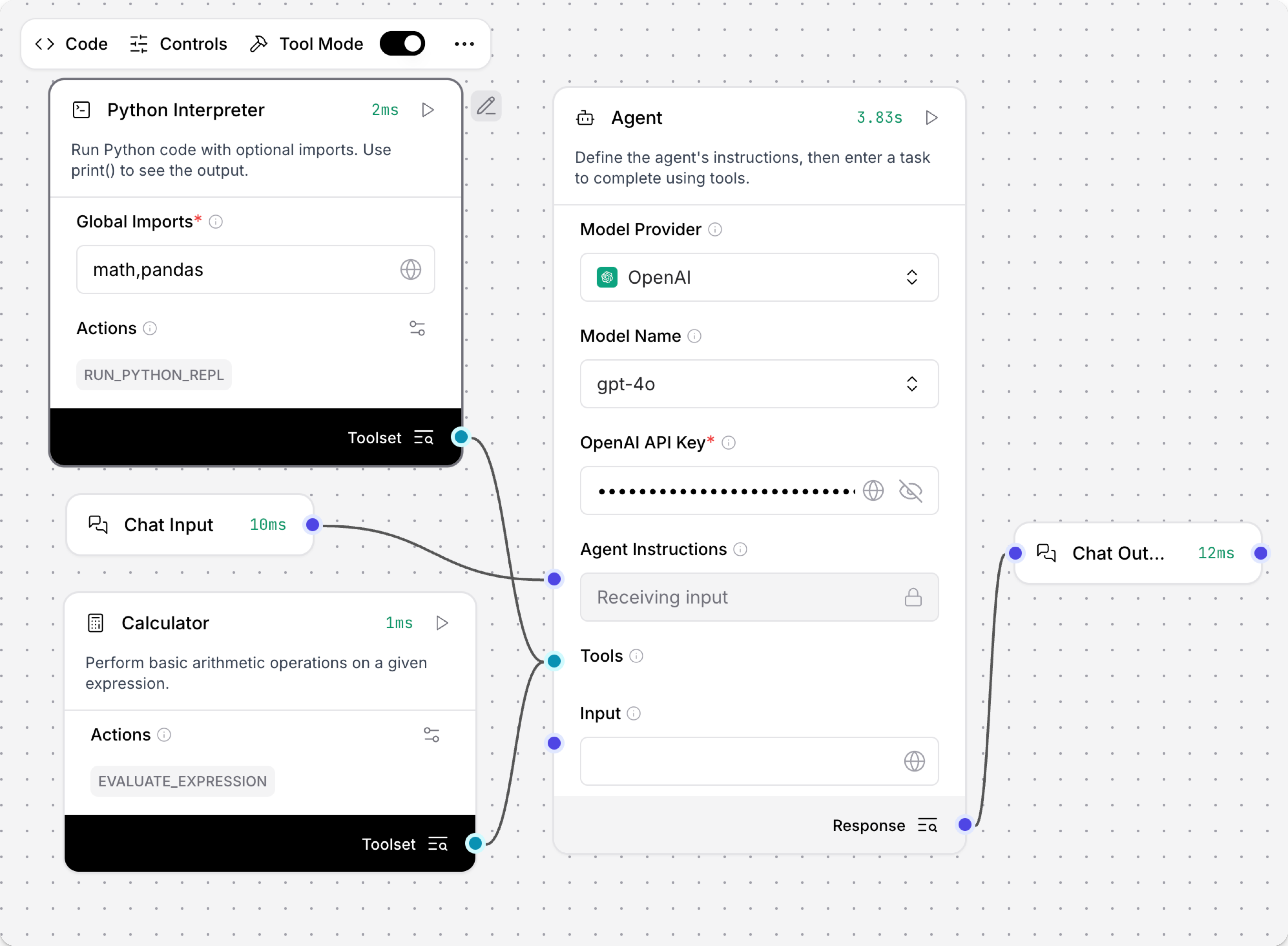
- Ask the agent an easier math question.
The Calculator tool can add, subtract, multiple, divide, or perform exponentiation.
The agent executes the
evaluate_expressiontool to correctly answer the question.
Result:
Executed evaluate_expression
Input:
{
  "expression": "2+5"
}
Output:
{
  "result": "7"
}
- Give the agent complete Python code.
This example creates a Pandas DataFrame table with the imported
pandaspackages, and returns the square root of the mean squares.
import pandas as pd
import math

# Create a simple DataFrame
df = pd.DataFrame({
    'numbers': [1, 2, 3, 4, 5],
    'squares': [x**2 for x in range(1, 6)]
})

# Calculate the square root of the mean
result = math.sqrt(df['squares'].mean())
print(f"Square root of mean squares: {result}")
The agent correctly chooses the run_python_repl tool to solve the problem.
Result:
Executed run_python_repl

Input:

{
  "python_code": "import pandas as pd\nimport math\n\n# Create a simple DataFrame\ndf = pd.DataFrame({\n    'numbers': [1, 2, 3, 4, 5],\n    'squares': [x**2 for x in range(1, 6)]\n})\n\n# Calculate the square root of the mean\nresult = math.sqrt(df['squares'].mean())\nprint(f\"Square root of mean squares: {result}\")"
}
Output:

{
  "result": "Square root of mean squares: 3.3166247903554"
}
If you don't include the package imports in the chat, the agent can still create the table using pd.DataFrame, because the pandas package is imported globally by the Python Interpreter component in the Global Imports field.
Pass inputs to the Python Interpreter
To pass inputs to the Python Interpreter component, you need to customize the component's code to add input fields. After the input field is added to the component code, the port becomes available for connections. For example, to connect a Chat Input component and pass a URL value to the Python Interpreter component, do the following:
-
Add a Python Interpreter component to your flow.
-
To modify the Python Interpreter component's code, click Edit Code.
-
To pass a URL input to the Python Interpreter component, make the following changes to the code:
a. Add the URL input field to the
inputslist. This creates the input port that other components can connect to.b. Update the
get_globalsmethod to extract the URL value and add it to the globals dictionary. This makes theurlvariable available in the component's Python code.c. Update the default Python code value to use the
urlvariable.The following example demonstrates these modifications.
Python code example
import importlib

from langchain_experimental.utilities import PythonREPL
from lfx.custom.custom_component.component import Component
from lfx.io import MultilineInput, Output, StrInput
from lfx.schema.data import Data
from lfx.schema.message import Message  # Needed to extract text from Message objects

class PythonREPLComponent(Component):
    display_name = "Python Interpreter"
    description = "Run Python code with optional imports. Use print() to see the output."
    documentation: str = "https://docs.langflow.org/python-interpreter"
    icon = "square-terminal"

    inputs = [
        StrInput(
            name="global_imports",
            display_name="Global Imports",
            info="A comma-separated list of modules to import globally, e.g. 'math,numpy,pandas'.",
            value="math,pandas",
            required=True,
        ),
        MultilineInput(
            name="python_code",
            display_name="Python Code",
            info="The Python code to execute. Only modules specified in Global Imports can be used. Use 'url' variable if URL input is connected.",
            value="print(f'URL: {url}')",  # Updated to make the URL variable available to the Python code execution
            input_types=["Message"],
            tool_mode=True,
            required=True,
        ),
        # Add the URL input field to inputs list
        StrInput(
            name="url",
            display_name="URL",
            info="URL variable that can be used in Python code. Connect a Text component or enter manually.",
            value="",
            input_types=["Text", "Message"],
            required=False,
        ),
    ]

    outputs = [
        Output(
            display_name="Results",
            name="results",
            type_=Data,
            method="run_python_repl",
        ),
    ]

    def get_globals(self, global_imports: str | list[str]) -> dict:
        """Create a globals dictionary with only the specified allowed imports and input variables."""
        global_dict = {}

        try:
            if isinstance(global_imports, str):
                modules = [module.strip() for module in global_imports.split(",")]
            elif isinstance(global_imports, list):
                modules = global_imports
            else:
                msg = "global_imports must be either a string or a list"
                raise TypeError(msg)

            for module in modules:
                try:
                    imported_module = importlib.import_module(module)
                    global_dict[imported_module.__name__] = imported_module
                except ImportError as e:
                    msg = f"Could not import module {module}: {e!s}"
                    raise ImportError(msg) from e

            # Add the URL variable to the component's globals dictionary
            # Extract from Message object or use the string directly
            if hasattr(self, "url") and self.url:
                url_value = self.url.text if isinstance(self.url, Message) else str(self.url)
                if url_value:
                    global_dict["url"] = url_value  # Makes 'url' available in Python code
                    self.log(f"URL variable set: {url_value}")

        except Exception as e:
            self.log(f"Error in global imports: {e!s}")
            raise
        else:
            self.log(f"Successfully imported modules: {list(global_dict.keys())}")
            return global_dict

    def run_python_repl(self) -> Data:
        try:
            # Extract Python code text if it's a Message object
            python_code_text = self.python_code
            if isinstance(python_code_text, Message):
                python_code_text = python_code_text.text if python_code_text.text else ""
            elif not isinstance(python_code_text, str):
                python_code_text = str(python_code_text)

            globals_ = self.get_globals(self.global_imports)
            python_repl = PythonREPL(_globals=globals_)
            result = python_repl.run(python_code_text)
            result = result.strip() if result else ""

            self.log("Code execution completed successfully")
            return Data(data={"result": result})

        except ImportError as e:
            error_message = f"Import Error: {e!s}"
            self.log(error_message)
            return Data(data={"error": error_message})

        except SyntaxError as e:
            error_message = f"Syntax Error: {e!s}"
            self.log(error_message)
            return Data(data={"error": error_message})

        except (NameError, TypeError, ValueError) as e:
            error_message = f"Error during execution: {e!s}"
            self.log(error_message)
            return Data(data={"error": error_message})

    def build(self):
return self.run_python_repl -
To save the modifications, click Check & Save.
-
Add a Text component to your flow and set its value, such as
google.com. -
Connect the Text component's output to the new URL input field on your customized Python Interpreter component.
The Python Interpreter component can now use the url variable in the Python code that it executes.
Isolate executions in a microVM
Set LANGFLOW_SANDBOX_BACKEND=exec-sandbox to run each Python Interpreter execution in a dedicated QEMU microVM instead of in the server process.
The VM has a read-only root filesystem, no host filesystem access, and no network unless you enable it.
-
Use Python 3.12 or later, QEMU 8 or later, and hardware virtualization. Use KVM on Linux, or HVF on macOS.
-
The microVM is not included with a default
uv pip install langflowinstallation. To install it, runuv pip install 'langflow[sandbox]'. If you enable the environment variable but don't install the sandbox package, the component errors. -
In your
.envfile, set:LANGFLOW_SANDBOX_BACKEND=exec-sandbox -
Restart Langflow.
If the sandbox is configured but unavailable, execution fails with an error, and Langflow does not fall back to in-process exec.
Sandboxed code may import any module already in the microVM's filesystem.
Langflow inserts import statements at the top of the script in the VM. Those packages must already be in the microVM's filesystem, not only in your Langflow environment.
Network access is off by default.
Code that fetches URLs needs LANGFLOW_SANDBOX_ALLOW_NETWORK=true and, for non-PyPI hosts, LANGFLOW_SANDBOX_ALLOWED_DOMAINS.
Set LANGFLOW_SANDBOX_ALLOW_SOFTWARE_EMULATION=true for trusted development or CI hosts without a hypervisor.
For more information, see Python Interpreter sandbox environment variables.
Python Interpreter parameters
| Name | Type | Description |
|---|---|---|
| global_imports | String | Input parameter. A comma-separated list of modules to import globally, such as math,pandas,numpy. |
| python_code | Code | Input parameter. The Python code to execute. Only modules specified in Global Imports can be used. |
| results | JSON | Output parameter. The output of the executed Python code, including any printed results or errors. |
Was this page helpful?
