Use Langflow as an A2A server
As of Langflow 1.11.x, A2A support is off by default. To enable it, set the following environment variable before starting Langflow:
LANGFLOW_A2A_ENABLED=true
Langflow supports the Agent2Agent (A2A) protocol. You can publish a flow so other agents can call it, and call remote A2A agents from inside a flow.
This page describes how to publish a flow as an A2A agent that A2A clients can discover and call.
To call remote A2A agents from inside a flow, see the A2A Agent component.
Prerequisites
LANGFLOW_A2A_ENABLEDset totrueon the Langflow server.- A Langflow flow that contains a Chat Input (or Human Input) component and a Chat Output component. An A2A caller sends a message and reads a reply, so a flow can be served as an agent only if it can receive and answer messages. Langflow marks an eligible flow as "agent-type" when the flow is saved from the Agent tab. A "workflow-typed" flow returns
404from the A2A endpoints even when publishing is enabled.
Publish a flow as an A2A agent
-
Open the flow that you want to publish.
-
In the visual editor's sidebar, click Agent.
The Agent pane appears.
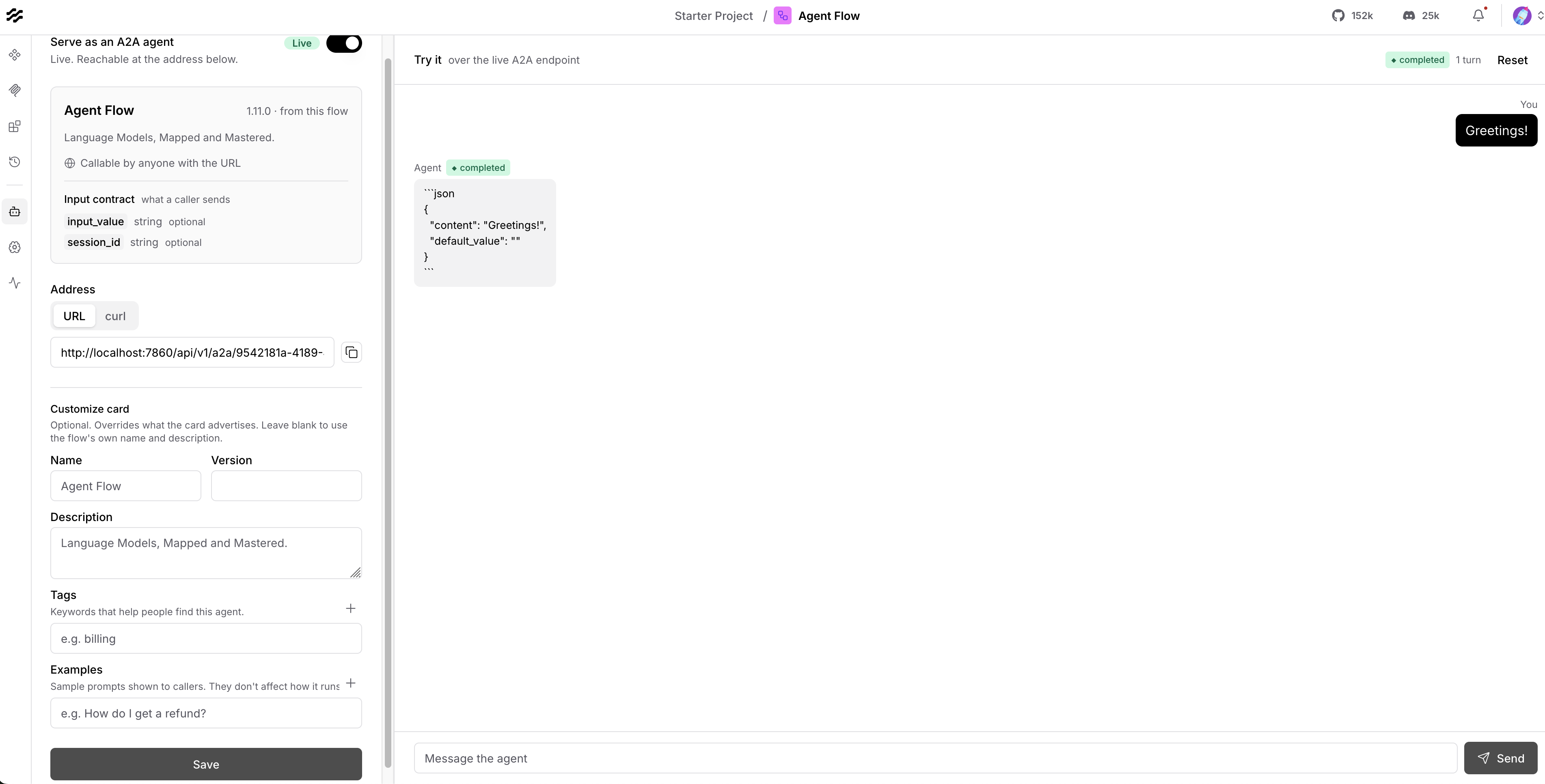
This pane configures serving the agent and displays its agent card, and includes a tester for the A2A endpoint.
If the flow to be published is missing a chat input or a chat output, the status reads Unavailable and the toggle is disabled.
If
LANGFLOW_A2A_ENABLEDis set tofalse, the status reads Off. -
Set Serve as an A2A agent to On.
The flow status changes to Draft. The flow is not served yet.
-
To publish the flow, click Save.
Langflow publishes the flow. The status changes to Live, and Langflow serves the flow's agent card and JSON-RPC endpoint.
-
To test the published agent, enter a message in the Try it pane, and then click Send.
Langflow sends the message over the live A2A endpoint and displays the agent's reply, so you can confirm the agent answers before you share the card URL.
If the project's authentication is set to API key or OAuth, an API key field is displayed. Paste a valid Langflow API key so the test request can authenticate. If project authentication is None, the field is hidden and no key is required.
-
To share the flow's endpoint, under Address, select URL.
Alternatively, select curl to create a
message/sendrequest.
To stop serving the flow, turn off Serve as an A2A agent, and then click Save.
A2A endpoints
When a flow is published, Langflow serves two endpoints for the flow:
| Endpoint | Description |
|---|---|
GET /api/v1/a2a/{flow_id}/.well-known/agent-card.json | The agent card used for client discovery. The A2A public card is unauthenticated per the A2A spec. |
POST /api/v1/a2a/{flow_id}/jsonrpc | The JSON-RPC endpoint. Supports message/send, message/stream, tasks/get, tasks/cancel, tasks/resubscribe, and the tasks/pushNotificationConfig/* methods. |
The card advertises protocolVersion 0.3.0 and JSONRPC as the preferred transport.
A message/send request runs the flow and returns a completed task carrying the agent's reply as a text artifact. To thread a multi-turn conversation, send a contextId. Langflow maps it to the flow's chat session, so messages that share a contextId share history.
Send a message
To send a message, use the JSON-RPC URL from the Address tab, and not the agent card URL.
Replace FLOW_ID with your flow ID. If the project's authentication requires a key, include x-api-key.
- Python
- TypeScript
- curl
import os
import uuid
import requests

url = "http://localhost:7860/api/v1/a2a/FLOW_ID/jsonrpc"
headers = {
    "Content-Type": "application/json",
    "x-api-key": os.environ["LANGFLOW_API_KEY"],  # omit if project auth is None
}
payload = {
    "jsonrpc": "2.0",
    "id": 1,
    "method": "message/send",
    "params": {
        "message": {
            "role": "user",
            "parts": [{"kind": "text", "text": "Hello"}],
            "messageId": uuid.uuid4().hex,
        }
    },
}

response = requests.post(url, headers=headers, json=payload, timeout=60)
response.raise_for_status()
print(response.json())
const url = "http://localhost:7860/api/v1/a2a/FLOW_ID/jsonrpc";

const response = await fetch(url, {
  method: "POST",
  headers: {
    "Content-Type": "application/json",
    "x-api-key": process.env.LANGFLOW_API_KEY!, // omit if project auth is None
  },
  body: JSON.stringify({
    jsonrpc: "2.0",
    id: 1,
    method: "message/send",
    params: {
      message: {
        role: "user",
        parts: [{ kind: "text", text: "Hello" }],
        messageId: crypto.randomUUID(),
      },
    },
  }),
});

if (!response.ok) {
  throw new Error(`A2A request failed: ${response.status}`);
}

console.log(await response.json());
curl -X POST "http://localhost:7860/api/v1/a2a/FLOW_ID/jsonrpc" \
  -H "Content-Type: application/json" \
  -H "x-api-key: LANGFLOW_API_KEY" \
  -d '{
    "jsonrpc": "2.0",
    "id": 1,
    "method": "message/send",
    "params": {
      "message": {
        "role": "user",
        "parts": [{"kind": "text", "text": "Hello"}],
        "messageId": "1"
      }
    }
  }'
A successful response is a completed task. The agent's reply text is in result.artifacts[0].parts[0].text. If multiple parts are present, iterate over result.artifacts[0].parts and read each part's text, or other fields by kind.
Example response:
{
  "id": 1,
  "jsonrpc": "2.0",
  "result": {
    "artifacts": [
      {
        "artifactId": "0775cf82-85b5-46a1-94aa-1e38db57cc2b",
        "name": "result",
        "parts": [
          {
            "kind": "text",
            "text": "Hello from docs test"
          }
        ]
      }
    ],
    "contextId": "8bc12160-1d54-4fe1-809d-95422945c3ed",
    "id": "7f3f305e-f02e-444a-90bf-01179646fd85",
    "kind": "task",
    "status": {
      "state": "completed",
      "timestamp": "2026-07-17T15:02:30.172601Z"
    }
  }
}
To read the task again later, call tasks/get:
curl -X POST "http://localhost:7860/api/v1/a2a/FLOW_ID/jsonrpc" \
  -H "Content-Type: application/json" \
  -H "x-api-key: LANGFLOW_API_KEY" \
  -d '{
    "jsonrpc": "2.0",
    "id": 2,
    "method": "tasks/get",
    "params": {
      "id": "7f3f305e-f02e-444a-90bf-01179646fd85"
    }
  }'
Example response (same task payload as message/send):
{
  "id": 2,
  "jsonrpc": "2.0",
  "result": {
    "artifacts": [
      {
        "artifactId": "0775cf82-85b5-46a1-94aa-1e38db57cc2b",
        "name": "result",
        "parts": [
          {
            "kind": "text",
            "text": "Hello from docs test"
          }
        ]
      }
    ],
    "contextId": "8bc12160-1d54-4fe1-809d-95422945c3ed",
    "id": "7f3f305e-f02e-444a-90bf-01179646fd85",
    "kind": "task",
    "status": {
      "state": "completed",
      "timestamp": "2026-07-17T15:02:30.172601Z"
    }
  }
}
To continue the same chat session, reuse contextId on later message/send requests:
curl -X POST "http://localhost:7860/api/v1/a2a/FLOW_ID/jsonrpc" \
  -H "Content-Type: application/json" \
  -H "x-api-key: LANGFLOW_API_KEY" \
  -d '{
    "jsonrpc": "2.0",
    "id": 3,
    "method": "message/send",
    "params": {
      "message": {
        "role": "user",
        "parts": [{"kind": "text", "text": "Follow-up"}],
        "messageId": "2",
        "contextId": "8bc12160-1d54-4fe1-809d-95422945c3ed"
      }
    }
  }'
Streaming and push notifications
The agent card advertises both streaming and pushNotifications.
Stream a message
To stream a message, call message/stream with the same message shape as message/send. The response is an SSE stream (Content-Type: text/event-stream) of JSON-RPC frames.
- Python
- TypeScript
- curl
import json
import os
import uuid
import requests

url = "http://localhost:7860/api/v1/a2a/FLOW_ID/jsonrpc"
headers = {
    "Content-Type": "application/json",
    "x-api-key": os.environ["LANGFLOW_API_KEY"],  # omit if project auth is None
}
payload = {
    "jsonrpc": "2.0",
    "id": 1,
    "method": "message/stream",
    "params": {
        "message": {
            "role": "user",
            "parts": [{"kind": "text", "text": "Hello"}],
            "messageId": uuid.uuid4().hex,
        }
    },
}

with requests.post(url, headers=headers, json=payload, stream=True, timeout=60) as response:
    response.raise_for_status()
    for line in response.iter_lines(decode_unicode=True):
        if line and line.startswith("data:"):
            print(json.loads(line.removeprefix("data:").strip()))
const url = "http://localhost:7860/api/v1/a2a/FLOW_ID/jsonrpc";

const response = await fetch(url, {
  method: "POST",
  headers: {
    "Content-Type": "application/json",
    "x-api-key": process.env.LANGFLOW_API_KEY!, // omit if project auth is None
  },
  body: JSON.stringify({
    jsonrpc: "2.0",
    id: 1,
    method: "message/stream",
    params: {
      message: {
        role: "user",
        parts: [{ kind: "text", text: "Hello" }],
        messageId: crypto.randomUUID(),
      },
    },
  }),
});

if (!response.ok || !response.body) {
  throw new Error(`A2A stream failed: ${response.status}`);
}

const reader = response.body.getReader();
const decoder = new TextDecoder();
let buffer = "";

while (true) {
  const { done, value } = await reader.read();
  if (done) break;
  buffer += decoder.decode(value, { stream: true });
  const lines = buffer.split("\n");
  buffer = lines.pop() ?? "";
  for (const line of lines) {
    if (line.startsWith("data:")) {
      console.log(JSON.parse(line.slice(5).trim()));
    }
  }
}
curl -N -X POST "http://localhost:7860/api/v1/a2a/FLOW_ID/jsonrpc" \
  -H "Content-Type: application/json" \
  -H "x-api-key: LANGFLOW_API_KEY" \
  -d '{
    "jsonrpc": "2.0",
    "id": 1,
    "method": "message/stream",
    "params": {
      "message": {
        "role": "user",
        "parts": [{"kind": "text", "text": "Hello"}],
        "messageId": "1"
      }
    }
  }'
Example SSE response (one JSON object per data: line):
data: {"id":1,"jsonrpc":"2.0","result":{"contextId":"57bcbe61-9a27-40eb-9040-cfa7a677df17","id":"0732102b-ac16-4b84-8a40-0ecb06be8788","kind":"task","status":{"state":"submitted"}}}

data: {"id":1,"jsonrpc":"2.0","result":{"contextId":"57bcbe61-9a27-40eb-9040-cfa7a677df17","final":false,"kind":"status-update","status":{"state":"working","timestamp":"2026-07-17T15:02:30.341209Z"},"taskId":"0732102b-ac16-4b84-8a40-0ecb06be8788"}}

data: {"id":1,"jsonrpc":"2.0","result":{"append":false,"artifact":{"artifactId":"675b035c-8fc3-4740-aed2-ee635dd4aa2b","name":"result","parts":[{"kind":"text","text":"Hello stream"}]},"contextId":"57bcbe61-9a27-40eb-9040-cfa7a677df17","kind":"artifact-update","lastChunk":false,"taskId":"0732102b-ac16-4b84-8a40-0ecb06be8788"}}

data: {"id":1,"jsonrpc":"2.0","result":{"contextId":"57bcbe61-9a27-40eb-9040-cfa7a677df17","final":true,"kind":"status-update","status":{"state":"completed","timestamp":"2026-07-17T15:02:30.389825Z"},"taskId":"0732102b-ac16-4b84-8a40-0ecb06be8788"}}
Resubscribe to a task
Call tasks/resubscribe with a task id to reattach to that task's event stream.
- Python
- TypeScript
- curl
import json
import os
import requests

url = "http://localhost:7860/api/v1/a2a/FLOW_ID/jsonrpc"
headers = {
    "Content-Type": "application/json",
    "x-api-key": os.environ["LANGFLOW_API_KEY"],  # omit if project auth is None
}
payload = {
    "jsonrpc": "2.0",
    "id": 12,
    "method": "tasks/resubscribe",
    "params": {"id": "TASK_ID"},
}

with requests.post(url, headers=headers, json=payload, stream=True, timeout=60) as response:
    response.raise_for_status()
    for line in response.iter_lines(decode_unicode=True):
        if line and line.startswith("data:"):
            print(json.loads(line.removeprefix("data:").strip()))
const url = "http://localhost:7860/api/v1/a2a/FLOW_ID/jsonrpc";

const response = await fetch(url, {
  method: "POST",
  headers: {
    "Content-Type": "application/json",
    "x-api-key": process.env.LANGFLOW_API_KEY!, // omit if project auth is None
  },
  body: JSON.stringify({
    jsonrpc: "2.0",
    id: 12,
    method: "tasks/resubscribe",
    params: { id: "TASK_ID" },
  }),
});

if (!response.ok || !response.body) {
  throw new Error(`A2A resubscribe failed: ${response.status}`);
}

const reader = response.body.getReader();
const decoder = new TextDecoder();
let buffer = "";

while (true) {
  const { done, value } = await reader.read();
  if (done) break;
  buffer += decoder.decode(value, { stream: true });
  const lines = buffer.split("\n");
  buffer = lines.pop() ?? "";
  for (const line of lines) {
    if (line.startsWith("data:")) {
      console.log(JSON.parse(line.slice(5).trim()));
    }
  }
}
curl -N -X POST "http://localhost:7860/api/v1/a2a/FLOW_ID/jsonrpc" \
  -H "Content-Type: application/json" \
  -H "x-api-key: LANGFLOW_API_KEY" \
  -d '{
    "jsonrpc": "2.0",
    "id": 12,
    "method": "tasks/resubscribe",
    "params": {
      "id": "a8820afb-7af7-4831-9233-b236e25e63be"
    }
  }'
If the task still has a live stream on the same worker, the subscriber receives SSE frames like message/stream. If the task is already finished, which is common for short sync runs, the stream ends with an error frame:
data: {"error":{"code":-32603,"message":"Task a8820afb-7af7-4831-9233-b236e25e63be has no active stream to resubscribe to"},"id":12,"jsonrpc":"2.0"}
Live resubscription queues are in-memory and per worker. In a multi-worker deployment, a tasks/resubscribe request routed to a different worker than the one running the task returns "no active stream". Prefer a single worker, or sticky routing to the worker that started the task.
Register a push notification webhook
Include pushNotificationConfig in the initial message/send or message/stream request so Langflow can POST lifecycle events to your webhook while the task runs. Registering after a blocking message/send returns does not replay events that already completed.
- Python
- TypeScript
- curl
import os
import uuid
import requests

url = "http://localhost:7860/api/v1/a2a/FLOW_ID/jsonrpc"
headers = {
    "Content-Type": "application/json",
    "x-api-key": os.environ["LANGFLOW_API_KEY"],  # omit if project auth is None
}
payload = {
    "jsonrpc": "2.0",
    "id": 1,
    "method": "message/send",
    "params": {
        "message": {
            "role": "user",
            "parts": [{"kind": "text", "text": "Hello"}],
            "messageId": uuid.uuid4().hex,
        },
        "configuration": {
            "pushNotificationConfig": {
                "url": "https://example.com/a2a-webhook",
            },
        },
    },
}

response = requests.post(url, headers=headers, json=payload, timeout=60)
response.raise_for_status()
print(response.json())
const url = "http://localhost:7860/api/v1/a2a/FLOW_ID/jsonrpc";

const response = await fetch(url, {
  method: "POST",
  headers: {
    "Content-Type": "application/json",
    "x-api-key": process.env.LANGFLOW_API_KEY!, // omit if project auth is None
  },
  body: JSON.stringify({
    jsonrpc: "2.0",
    id: 1,
    method: "message/send",
    params: {
      message: {
        role: "user",
        parts: [{ kind: "text", text: "Hello" }],
        messageId: crypto.randomUUID(),
      },
      configuration: {
        pushNotificationConfig: {
          url: "https://example.com/a2a-webhook",
        },
      },
    },
  }),
});

if (!response.ok) {
  throw new Error(`A2A request failed: ${response.status}`);
}

console.log(await response.json());
curl -X POST "http://localhost:7860/api/v1/a2a/FLOW_ID/jsonrpc" \
  -H "Content-Type: application/json" \
  -H "x-api-key: LANGFLOW_API_KEY" \
  -d '{
    "jsonrpc": "2.0",
    "id": 1,
    "method": "message/send",
    "params": {
      "message": {
        "role": "user",
        "parts": [{"kind": "text", "text": "Hello"}],
        "messageId": "1"
      },
      "configuration": {
        "pushNotificationConfig": {
          "url": "https://example.com/a2a-webhook"
        }
      }
    }
  }'
To add or update a webhook on a task that is still active, call tasks/pushNotificationConfig/set with a taskId and a public http or https webhook URL. That method only affects future events, and does not replay lifecycle events that already happened.
curl -X POST "http://localhost:7860/api/v1/a2a/FLOW_ID/jsonrpc" \
  -H "Content-Type: application/json" \
  -H "x-api-key: LANGFLOW_API_KEY" \
  -d '{
    "jsonrpc": "2.0",
    "id": 3,
    "method": "tasks/pushNotificationConfig/set",
    "params": {
      "taskId": "TASK_ID",
      "pushNotificationConfig": {
        "url": "https://example.com/a2a-webhook"
      }
    }
  }'
Example response:
{
  "id": 3,
  "jsonrpc": "2.0",
  "result": {
    "pushNotificationConfig": {
      "id": "7f3f305e-f02e-444a-90bf-01179646fd85",
      "url": "https://example.com/a2a-webhook"
    },
    "taskId": "7f3f305e-f02e-444a-90bf-01179646fd85"
  }
}
Push notification configurations are in-memory and per worker. In a multi-worker deployment, a later tasks/pushNotificationConfig/* call or webhook dispatch can miss config stored on another worker. Prefer a single worker, or sticky routing to the worker that registered the webhook.
List registered webhooks for a task with tasks/pushNotificationConfig/list:
- Python
- TypeScript
- curl
import os
import requests

url = "http://localhost:7860/api/v1/a2a/FLOW_ID/jsonrpc"
headers = {
    "Content-Type": "application/json",
    "x-api-key": os.environ["LANGFLOW_API_KEY"],  # omit if project auth is None
}
payload = {
    "jsonrpc": "2.0",
    "id": 4,
    "method": "tasks/pushNotificationConfig/list",
    "params": {"id": "TASK_ID"},
}

response = requests.post(url, headers=headers, json=payload, timeout=60)
response.raise_for_status()
print(response.json())
const url = "http://localhost:7860/api/v1/a2a/FLOW_ID/jsonrpc";

const response = await fetch(url, {
  method: "POST",
  headers: {
    "Content-Type": "application/json",
    "x-api-key": process.env.LANGFLOW_API_KEY!, // omit if project auth is None
  },
  body: JSON.stringify({
    jsonrpc: "2.0",
    id: 4,
    method: "tasks/pushNotificationConfig/list",
    params: { id: "TASK_ID" },
  }),
});

if (!response.ok) {
  throw new Error(`A2A push list failed: ${response.status}`);
}

console.log(await response.json());
curl -X POST "http://localhost:7860/api/v1/a2a/FLOW_ID/jsonrpc" \
  -H "Content-Type: application/json" \
  -H "x-api-key: LANGFLOW_API_KEY" \
  -d '{
    "jsonrpc": "2.0",
    "id": 4,
    "method": "tasks/pushNotificationConfig/list",
    "params": {
      "id": "7f3f305e-f02e-444a-90bf-01179646fd85"
    }
  }'
Example response:
{
  "id": 4,
  "jsonrpc": "2.0",
  "result": [
    {
      "pushNotificationConfig": {
        "id": "7f3f305e-f02e-444a-90bf-01179646fd85",
        "url": "https://example.com/a2a-webhook"
      },
      "taskId": "7f3f305e-f02e-444a-90bf-01179646fd85"
    }
  ]
}
Webhook URLs are validated when they are registered. Only http and https URLs that resolve entirely to public addresses are accepted; loopback, private, link-local, reserved, multicast, and unspecified targets are rejected. To allow private webhook targets on a trusted internal network, set LANGFLOW_A2A_ALLOW_PRIVATE_WEBHOOKS to true.
You can also manage configs with tasks/pushNotificationConfig/get and tasks/pushNotificationConfig/delete.
Cancel a task
To cancel an active task, such as a task waiting for human input, call tasks/cancel with the task id to cancel.
curl -X POST "http://localhost:7860/api/v1/a2a/FLOW_ID/jsonrpc" \
  -H "Content-Type: application/json" \
  -H "x-api-key: LANGFLOW_API_KEY" \
  -d '{
    "jsonrpc": "2.0",
    "id": 4,
    "method": "tasks/cancel",
    "params": {
      "id": "7f3f305e-f02e-444a-90bf-01179646fd85"
    }
  }'
Langflow persists the canceled state, so a later tasks/get returns canceled.
A task that has already completed or failed cannot be canceled.
Customize the agent card
In the A2A protocol, an agent card is a JSON file that clients fetch to learn what the agent does and how to communicate with it.
When you publish a flow, Langflow serves the card at /.well-known/agent-card.json.
By default the card uses the flow's name and description, the Langflow version, and a single skill derived from the flow's input schema. In the Agent tab, under Customize card, you can configure the following fields in the agent card:
| Field | Description |
|---|---|
| Name | The agent name. Defaults to the flow name. |
| Version | The advertised version. Defaults to the Langflow version. |
| Description | The agent description. Defaults to the flow description. |
| Tags | Keywords that help people find the agent. Defaults to langflow. |
| Examples | Sample prompts shown to callers. They don't affect how the agent runs. |
Click Save to apply your overrides.
The Agent tab also displays the card's Input contract, derived from the flow's input schema. The Input contract is a list of the fields the agent expects from the caller, similar to an MCP tool's input schema.
Authentication
The agent card itself is always public, so clients can always discover the agent. Only the JSON-RPC endpoint enforces authentication. Whether that endpoint requires a key depends on the authentication settings of the flow's project:
- None: The endpoint is public. The card advertises no security scheme and callers omit
x-api-key. - API key: The card advertises an
apiKeysecurity scheme.message/sendandmessage/streamrequire a valid Langflow API key in thex-api-keyheader. Requests without a valid key return401. - OAuth: Not supported for A2A as of Langflow 1.11.x. This setting behaves the same as API key.
Authenticated request example:
curl -X POST "http://localhost:7860/api/v1/a2a/FLOW_ID/jsonrpc" \
  -H "Content-Type: application/json" \
  -H "x-api-key: LANGFLOW_API_KEY" \
  -d '{
    "jsonrpc": "2.0",
    "id": 1,
    "method": "message/send",
    "params": {
      "message": {
        "role": "user",
        "parts": [{"kind": "text", "text": "Hello"}],
        "messageId": "1"
      }
    }
  }'
Human-in-the-loop agents
If the flow pauses for human input, message/send returns a task in the input-required state along with the prompt. To resume, send another message/send with the same taskId and contextId carrying the human's response. Langflow restores the paused flow from its checkpoint and continues the flow run.
Call a remote A2A agent
The A2A Agent component lets a flow call a flow within the same Langflow project, or call out to any remote spec-compliant A2A agent.
For more information, see A2A Agent component.
A2A environment variables
| Variable | Default | Description |
|---|---|---|
LANGFLOW_A2A_ENABLED | false | Enables the A2A card and JSON-RPC endpoints for agent-typed, published flows. |
LANGFLOW_A2A_ALLOW_PRIVATE_WEBHOOKS | false | Allows push-notification webhooks that resolve to private addresses. Use only on a trusted internal network. |
Was this page helpful?
