Build flows and components with Langflow Assistant
Langflow Assistant is an in-app virtual assistant pane accessible from the canvas toolbar.
It can answer questions about the application and help you get more out of Langflow.
Langflow Assistant understands the structure of the Langflow graph, so it can build complete flows or create individual components from natural language prompts.
Behind the scenes, Langflow Assistant runs a built-in Langflow flow on your Langflow server each time you send a message. This flow is distinct from the flow that is open in the canvas, and has its own language model. The language model in Langflow Assistant only has the currently opened flow in your workspace for context. To give Langflow Assistant context for a different flow, switch to that flow in your workspace, and open Langflow Assistant.
Prerequisites
-
Connect an LLM provider in the Global model providers page for Langflow Assistant to use
-
LANGFLOW_AGENTIC_EXPERIENCEmust betrue(default).Langflow Assistant is available out of the box. Set this to
falseto turn it off for a deployment, for example if you don't want model-generated component code running on your server. While it is off, the Assistant's endpoints return404. For more information, see Supported environment variables. -
Custom component creation must be enabled and permitted for your user role:
LANGFLOW_ALLOW_CUSTOM_COMPONENTSmust betrue(default).LANGFLOW_CUSTOM_COMPONENT_ADMIN_ONLYmust befalse(default) for non-superusers. For superusers, this option is irrelevant.
For more information, see Restrict custom component creation to superusers.
Create a custom component with Langflow Assistant
In this example, you'll prompt Langflow Assistant to create a custom component that validates and normalizes a list of URLs.
You'll then iterate on the code based on the results in the Playground.
-
In the canvas toolbar, click the Langflow icon. The Langflow Assistant pane opens.
-
Optionally, ask
What can you help me with?for a list of Langflow Assistant's capabilities. -
Prompt Langflow Assistant to generate a custom component. For example:
Create a custom component URLTitleExtractor with:
input: text
output: list of {url, title, status}
timeout handling + per-URL error handling
clean docstring and typed methods.” -
Langflow Assistant generates component code from your prompt. Because generation is model-driven, your code may differ from the example below.
Python component code
import html
import re
from typing import Any
from urllib.error import HTTPError, URLError
from urllib.request import Request, urlopen

from lfx.custom import Component
from lfx.io import FloatInput, MessageTextInput, Output
from lfx.schema import DataFrame


class URLTitleExtractor(Component):
    """Extract URLs from text, fetch each page, and return URL/title/status rows."""

    display_name = "URLTitleExtractor"
    description = "Extracts URLs from input text and fetches page titles with per-URL status handling."
    icon = "Link"

    inputs = [
        MessageTextInput(
            name="text",
            display_name="Text",
            info="Text that may contain one or more URLs.",
            required=True,
        ),
        FloatInput(
            name="timeout",
            display_name="Timeout",
            value=5.0,
            info="HTTP request timeout in seconds for each URL.",
            range_spec={"min": 0.1, "max": 60.0, "step": 0.1, "step_type": "float"},
        ),
    ]

    outputs = [
        Output(
            name="dataframe",
            display_name="DataFrame",
            method="build_dataframe",
        ),
    ]

    URL_PATTERN = re.compile(r"https?://[^\s<>\]\"'`{}|\\^]+", re.IGNORECASE)
    TITLE_PATTERN = re.compile(r"<title\b[^>]*>(.*?)</title>", re.IGNORECASE | re.DOTALL)

    def build_dataframe(self) -> DataFrame:
        """Build a DataFrame containing URL, extracted title, and request status."""
        urls = self._extract_urls(self.text)
        rows = [self._process_url(url, self.timeout) for url in urls]
        return DataFrame(rows)

    def _extract_urls(self, text: str) -> list[str]:
        """Extract unique URLs from text using a conservative regex."""
        if not text:
            return []

        matches = self.URL_PATTERN.findall(text)
        cleaned_urls: list[str] = []
        seen: set[str] = set()

        for url in matches:
            cleaned = url.rstrip(".,);:!?]}")
            if cleaned and cleaned not in seen:
                seen.add(cleaned)
                cleaned_urls.append(cleaned)

        return cleaned_urls

    def _process_url(self, url: str, timeout: float) -> dict[str, Any]:
        """Fetch a URL and return a row with url, title, and status."""
        request = Request(
            url,
            headers={
                "User-Agent": "Mozilla/5.0 (compatible; Langflow URLTitleExtractor/1.0)"
            },
        )

        try:
            with urlopen(request, timeout=float(timeout)) as response:
                status_code = getattr(response, "status", 200)
                content_bytes = response.read()
                content_type = response.headers.get_content_charset() or "utf-8"
                html_text = content_bytes.decode(content_type, errors="replace")
                title = self._extract_title(html_text)
                return {"url": url, "title": title, "status": str(status_code)}

        except HTTPError as exc:
            title = ""
            try:
                body = exc.read()
                charset = exc.headers.get_content_charset() if exc.headers else None
                if body:
                    html_text = body.decode(charset or "utf-8", errors="replace")
                    title = self._extract_title(html_text)
            except Exception:
                title = ""
            return {"url": url, "title": title, "status": str(exc.code)}

        except TimeoutError:
            return {"url": url, "title": "", "status": "timeout"}

        except URLError as exc:
            reason = getattr(exc, "reason", None)
            if isinstance(reason, TimeoutError):
                status = "timeout"
            else:
                status = "request_error"
            return {"url": url, "title": "", "status": status}

        except Exception:
            return {"url": url, "title": "", "status": "request_error"}

    def _extract_title(self, html_text: str) -> str:
        """Extract and normalize the HTML title from a document string."""
        if not html_text:
            return ""

        match = self.TITLE_PATTERN.search(html_text)
        if not match:
            return ""

        title = html.unescape(match.group(1))
        title = re.sub(r"\s+", " ", title).strip()
        return title
To inspect the code, click View Code. To add the component to the canvas, click Add to Canvas.
-
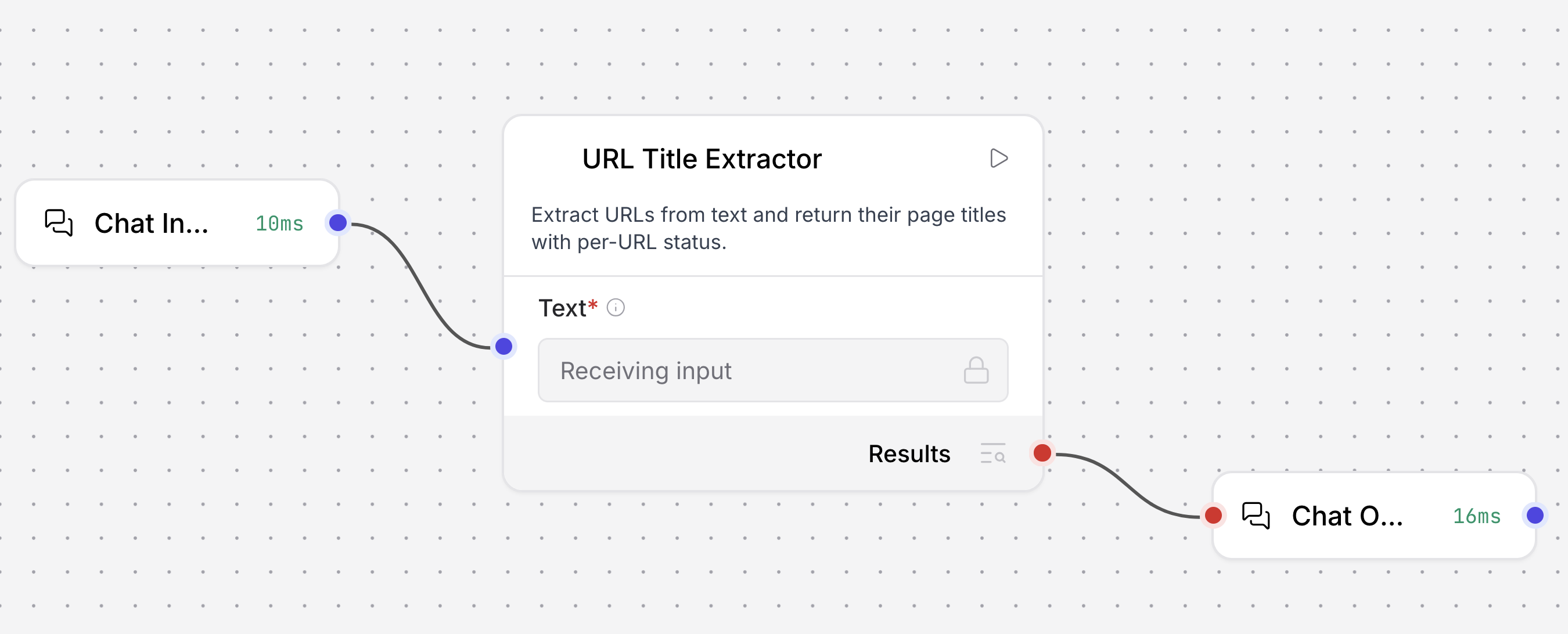
Connect the component to Chat Input and Chat Output components. At this point your flow has three connected components:
- Chat Input sends the text that contains URLs into the URLTitleExtractor so the flow runs when you chat in the Playground or send a prompt from an app.
- URLTitleExtractor reads that text, finds URLs, fetches each page, and outputs a Table with
url,title, andstatuscolumns. - Chat Output receives URLTitleExtractor's result and displays the Table back to the user or calling application.
-
Open the Playground, and tell Langflow to check a list of URLs. For example:
Check these links: https://langflow.org
https://github.com/langflow-ai/langflow
https://python.org
https://this-domain-should-not-resolve-12345.invalid -
Run the flow. The output will be similar to the following, with a Table with one row per URL, including page titles and status codes.
url title status https://langflow.org Langflow | Low-code AI builder for agentic and RAG applications 200 https://github.com/langflow-ai/langflow GitHub - langflow-ai/langflow: Langflow is a powerful tool for building and deploying AI-powered agents and workflows. - GitHub 200 https://python.org Welcome to Python.org 200 https://this-domain-should-not-resolve-12345.invalid -
To iterate further, tell Langflow Assistant what you want. For example, prompt it to
Update URLTitleExtractor to add max_urls (default 5) and skip duplicates..Langflow Assistant generates an updated URLTitleExtractor component (again, the exact code may differ from a previous run).
-
Replace the old component with the new component. Set max_urls to
3. In the Playground, enter a list that includes a duplicate URL and the invalid URL from before:Check these links: https://langflow.org
https://github.com/langflow-ai/langflow
https://python.org
https://langflow.org
https://this-domain-should-not-resolve-12345.invalid -
Run the flow. The output will be similar to the following, with the duplicate
https://langflow.orgremoved and only 3 valid URLs displayed.url title status https://langflow.org Langflow | Low-code AI builder for agentic and RAG applications 200 https://github.com/langflow-ai/langflow GitHub - langflow-ai/langflow: Langflow is a powerful tool for building and deploying AI-powered agents and workflows. - GitHub 200 https://python.org Welcome to Python.org 200
Build an agent flow with Langflow Assistant
Building a flow reads and writes the entire Langflow graph on every turn, which can use significantly more tokens than single-component generation.
In addition to generating individual components, Langflow Assistant can create a flow from a single prompt.
Continuing from the Create a custom component with Langflow Assistant example, ask Langflow Assistant to build a simple agent flow that uses the URLTitleExtractor custom component as a tool.
-
With the URLTitleExtractor component still on the canvas, open Langflow Assistant and prompt it to build the agent flow:
Build a simple agent flow using the URLTitleExtractor custom component as a tool. -
Langflow Assistant presents a diagram of the flow it is proposing. To approve, click Add to Canvas.
Langflow Assistant adds an Agent component, connects the URLTitleExtractor to its Tools input, and connects Chat Input and Chat Output to complete the flow. Flow generation is model-driven, so the exact wiring may differ from this example.
-
To iterate, describe changes to Langflow Assistant, and then click Replace canvas to replace the entire flow currently on the canvas. For example:
Connect the URLTitleExtractor component's Toolset port to the Agent's Tools port. -
Open the Playground and ask the agent to check a URL:
What is the title of the page at https://langflow.org?The agent uses the URLTitleExtractor tool to fetch the page and return the title.
-
Langflow Assistant can further iterate on the flow, or answer questions about Langflow. For example, ask Langflow Assistant
How do I send an API request to chat with this flow in Python?The response includes a request sourced from the Langflow documentation that you can copy and paste into your application.
Reference canvas components in your prompts
Reference components and their fields directly in a Langflow Assistant prompt using the @ and . selectors.
In the Langflow Assistant prompt input, enter @ to list all available components, and then select a component to insert its reference.
To select a specific field within a component, enter . after the component.
For example, to prompt Langflow Assistant to update the system prompt field on an Agent component, enter the following:
Update @Agent.System Prompt to always respond in bullet points.
Use a local or OpenAI-compatible model
Langflow Assistant can run on a model served from your own machine or from any OpenAI-compatible endpoint, so your prompts never leave your environment.
To use a local model served by Ollama, set the OLLAMA_BASE_URL global variable to your Ollama server, such as http://localhost:11434.
Ollama requires no API key.
To use an OpenAI-compatible server instead of OpenAI itself, set the OPENAI_BASE_URL global variable to your server's URL, and set OPENAI_API_KEY to the key your server expects.
You can set both values as global variables or as environment variables of the same name. Global variables take precedence, and Langflow falls back to the environment variable when no global variable is set.
Langflow Assistant builds flows by calling tools, so it requires a model that supports tool calling. Small local models often can't call tools reliably, which appears as an Assistant that only chats and never changes your canvas. If the Assistant doesn't act on your prompts, try a larger model.
Connect an external client with MCP
Langflow Assistant and Langflow's flow-authoring tools are available to external MCP clients, such as Cursor, Claude Code, and Codex, over a streamable HTTP MCP server at /api/v1/agentic/mcp.
This lets a client build, inspect, patch, and run your flows without opening the visual editor, including a run_assistant tool that calls Langflow Assistant itself.
Changes are saved to your flows and appear in the visual editor.
The flow-authoring tools don't require LANGFLOW_AGENTIC_EXPERIENCE, because each one is a Langflow API call that your API key already authorizes.
Only run_assistant requires it: while the Assistant is disabled, that single tool isn't listed and returns an error explaining why, and the rest of the toolkit keeps working.
Authenticate with a Langflow API key, in the same way as Langflow's other MCP endpoints:
curl -X POST "$LANGFLOW_URL/api/v1/agentic/mcp" \
  -H "x-api-key: $LANGFLOW_API_KEY" \
  -H "Content-Type: application/json"
For an MCP client, point it at $LANGFLOW_URL/api/v1/agentic/mcp with your API key as an x-api-key header.
Every tool call is authorized as your own user, so a client can only reach the flows your API key can reach.
For more information on creating an API key, see API keys.
See also
Was this page helpful?
