IBM
Basic IBM support is available in all Langflow installations through the core Language Model component. This bundle adds an enhanced IBM component with additional provider-specific parameters.
If you installed lfx directly (not as part of langflow), install the IBM bundle separately:
- Run
uv pip install lfx-ibm. - Restart Langflow.
- To confirm the bundle loaded, run
lfx extension list.
If you installed Langflow with uv pip install langflow, these bundle components are already included.
For more information, see Install LFX with bundle components.
Bundles contain custom components that support specific third-party integrations with Langflow.
The IBM bundle provides access to IBM watsonx.ai models for text and embedding generation, IBM watsonx.data (Presto SQL and the watsonx.data remote MCP server), and an IBM Db2 Vector Store.
These components require an IBM watsonx.ai deployment with API credentials, a watsonx.data instance, and/or a reachable IBM Db2 instance with the ibm-db driver.
For IBM Confluent (Kafka, Flink, Tableflow, and the Real-Time Context Engine) — the data-in-motion half of IBM's streaming lakehouse — see the IBM Confluent bundle.
IBM watsonx.ai
The IBM watsonx.ai component generates text using supported foundation models in IBM watsonx.ai. To use gateway models, use the OpenAI text generation component with the gateway model's OpenAI-compatible endpoint.
You can use the IBM watsonx.ai component anywhere you need a language model in a flow.
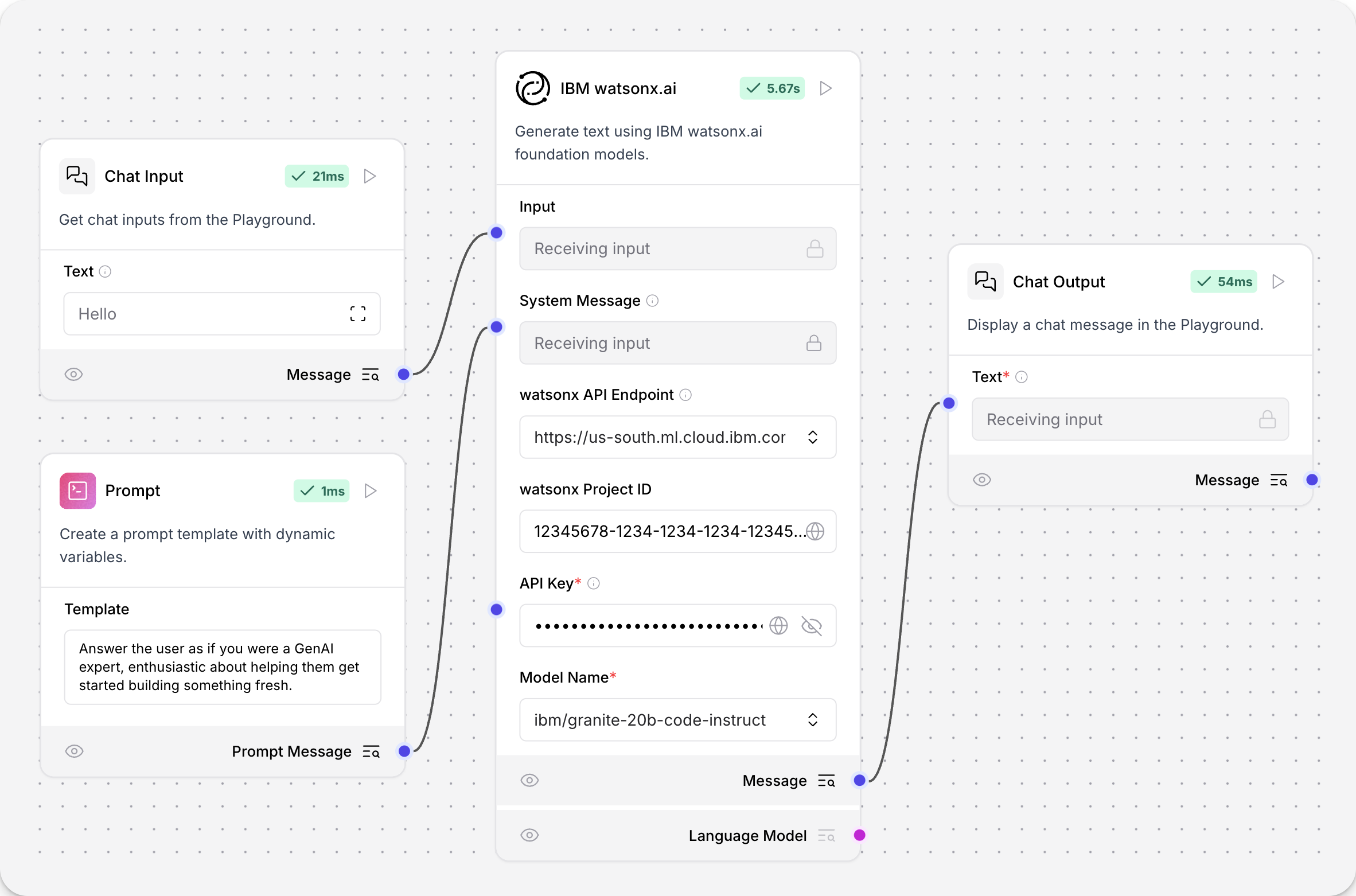
IBM watsonx.ai parameters
Some parameters are hidden by default in the visual editor. You can modify all component parameters through the component inspection panel that appears when you select a component.
| Name | Type | Description |
|---|---|---|
| url | String | Input parameter. The watsonx API base URL for your deployment and region. |
| project_id | String | Input parameter. Your watsonx Project ID. |
| api_key | SecretString | Input parameter. A watsonx API key to authenticate watsonx API access to the specified watsonx.ai deployment and model. |
| model_name | String | Input parameter. The name of the watsonx model to use. Options are dynamically fetched from the API. |
| max_tokens | Integer | Input parameter. The maximum number of tokens to generate. Default: 1000. |
| stop_sequence | String | Input parameter. The sequence where generation should stop. |
| temperature | Float | Input parameter. Controls randomness in the output. Default: 0.1. |
| top_p | Float | Input parameter. Controls nucleus sampling, which limits the model to tokens whose probability is below the top_p value. Range: Default: 0.9. |
| frequency_penalty | Float | Input parameter. Controls frequency penalty. A positive value decreases the probability of repeating tokens, and a negative value increases the probability. Range: Default: 0.5. |
| presence_penalty | Float | Input parameter. Controls presence penalty. A positive value increases the likelihood of new topics being introduced. Default: 0.3. |
| seed | Integer | Input parameter. A random seed for the model. Default: 8. |
| logprobs | Boolean | Input parameter. Whether to return log probabilities of output tokens or not. Default: true. |
| top_logprobs | Integer | Input parameter. The number of most likely tokens to return at each position. Default: 3. |
| logit_bias | String | Input parameter. A JSON string of token IDs to bias or suppress. |
IBM watsonx.ai output
The IBM watsonx.ai component can output either a Model Response (Message) or a Language Model (LanguageModel).
Use the Language Model output when you want to use an IBM watsonx.ai model as the LLM for another LLM-driven component, such as an Agent or Smart Transform component. For more information, see Language model components.
The LanguageModel output from the IBM watsonx.ai component is an instance of [ChatWatsonx](https://docs.langchain.com/oss/python/integrations/chat/ibm_watsonx) configured according to the component's parameters.
IBM watsonx.ai Embeddings
The IBM watsonx.ai Embeddings component uses the supported foundation models in IBM watsonx.ai for embedding generation.
The output is Embeddings generated with WatsonxEmbeddings.
For more information about using embedding model components in flows, see Embedding model components.
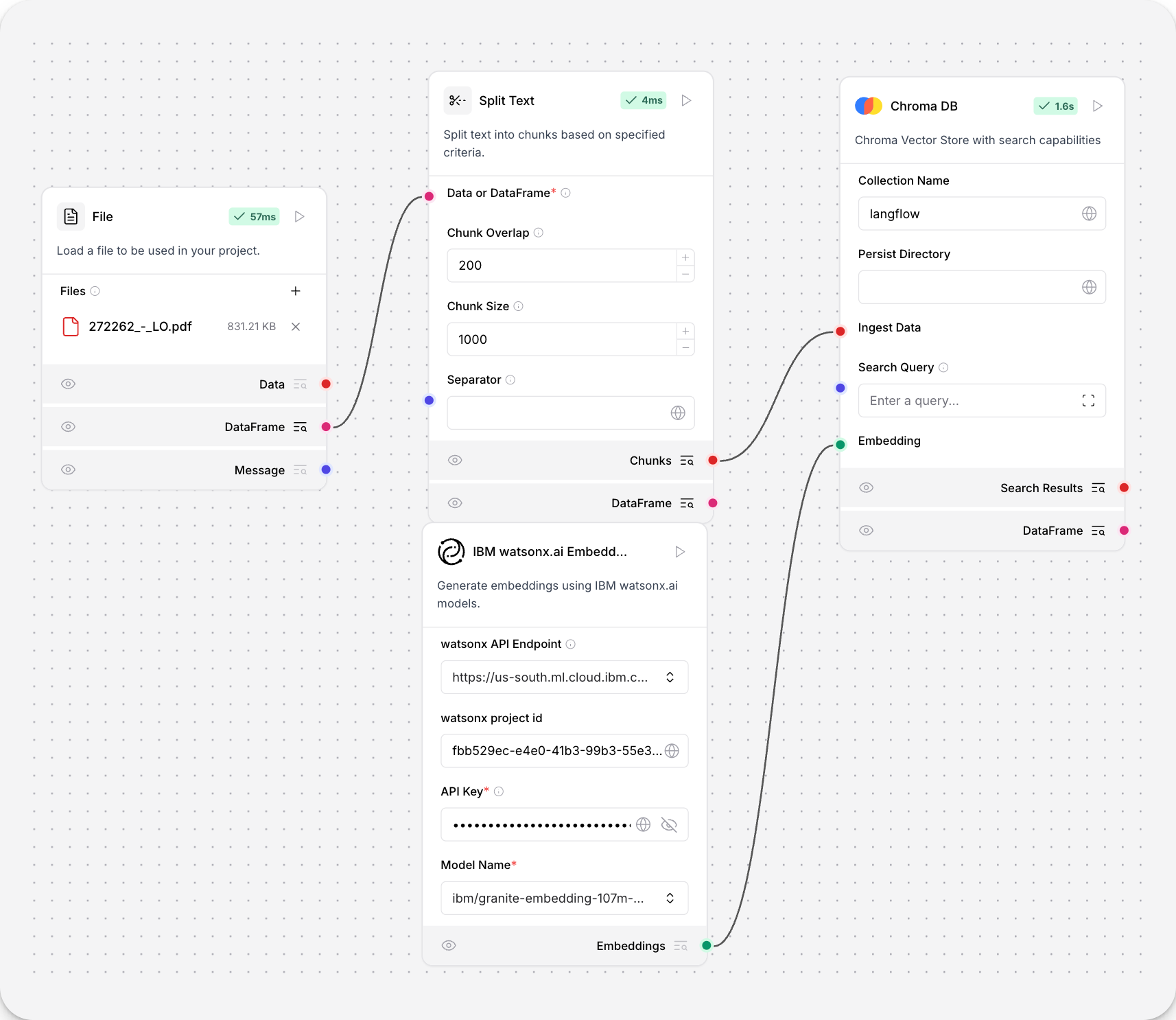
IBM watsonx.ai Embeddings parameters
Some parameters are hidden by default in the visual editor. You can modify all component parameters through the component inspection panel that appears when you select a component.
| Name | Display Name | Info |
|---|---|---|
| url | watsonx API Endpoint | Input parameter. The watsonx API base URL for your deployment and region. |
| project_id | watsonx project id | Input parameter. Your watsonx Project ID. |
| api_key | API Key | Input parameter. A watsonx API key to authenticate watsonx API access to the specified watsonx.ai deployment and model. |
| model_name | Model Name | Input parameter. The name of the embedding model to use. Supports default embedding models and automatically updates after connecting to your watsonx.ai deployment. |
| truncate_input_tokens | Truncate Input Tokens | Input parameter. The maximum number of tokens to process. Default: 200. |
| input_text | Include the original text in the output | Input parameter. Determines if the original text is included in the output. Default: true. |
Default embedding models
By default, the IBM watsonx.ai Embeddings component supports the following default models:
sentence-transformers/all-minilm-l12-v2: 384-dimensional embeddingsibm/slate-125m-english-rtrvr-v2: 768-dimensional embeddingsibm/slate-30m-english-rtrvr-v2: 768-dimensional embeddingsintfloat/multilingual-e5-large: 1024-dimensional embeddings
After entering your API endpoint and credentials, the component automatically fetches the list of available models from your watsonx.ai deployment.
IBM Db2 Vector Store
You can use the IBM Db2 Vector Store component to read and write to an IBM Db2 database using an instance of DB2VS vector store.
Includes support for remote Db2 instances with enterprise-grade security and performance.
About vector store instances
Because Langflow is based on LangChain, vector store components use an instance of LangChain vector store to drive the underlying read and write functions. These instances are provider-specific and configured according to the component's parameters, such as the connection string, index name, and schema.
In component code, this is often instantiated as vector_store, but some vector store components use a different name, such as the provider name.
Some LangChain classes don't expose all possible options as component parameters. Depending on the provider, these options might use default values or allow modification through environment variables, if they are supported in Langflow. For information about specific options, see the LangChain API reference and vector store provider's documentation.
When writing, the component can create a new table at the specified location.
IBM Db2 Vector Store provides enterprise-grade vector search capabilities with built-in security validation and support for multiple distance strategies.
If you use a vector store component to query your vector database, it produces search results that you can pass to downstream components in your flow as a list of JSON objects or a tabular Table.
If both types are supported, you can set the format near the vector store component's output port in the visual editor.
Use the IBM Db2 Vector Store component in a flow
The IBM Db2 Vector Store component can be used for both reads and writes:
-
When writing, it splits
JSONfrom a URL component into chunks, computes embeddings with attached Embedding Model component, and then loads the chunks and embeddings into the Db2 vector store. To trigger writes, click Run component on the IBM Db2 Vector Store component. -
When reading, it uses chat input to perform a similarity search on the vector store, and then print the search results to the chat. To trigger reads, open the Playground and enter a chat message.
After running the flow once, you can click Inspect Output on each component to understand how the data transformed as it passed from component to component.
IBM Db2 Vector Store parameters
You can inspect a vector store component's parameters to learn more about the inputs it accepts, the features it supports, and how to configure it.
Some parameters are hidden by default in the visual editor. You can modify all component parameters through the component inspection panel that appears when you select a component.
Some parameters are conditional, and they are only available after you set other parameters or select specific options for other parameters. Conditional parameters may not be visible on the Controls pane until you set the required dependencies.
For information about accepted values and functionality, see the provider's documentation or inspect component code.
| Name | Type | Description |
|---|---|---|
Table Name (collection_name) | String | Input parameter. The name of your Db2 table to store vectors. Default: LANGFLOW_VECTORS. The table will be created if it doesn't exist. |
Database Name (database) | String | Input parameter. Name of the Db2 database. Use a Generic-typed global variable or direct input. Credential-typed variables are not allowed for database names. |
Hostname (hostname) | String | Input parameter. Db2 server hostname or IP address. Use a Generic-typed global variable or direct input. |
Port (port) | Integer | Input parameter. Db2 server port. Default: 50000. |
Username (username) | String | Input parameter. Db2 database username. Use a Generic-typed global variable or direct input. |
Password (password) | String | Input parameter. Db2 database password. This should use a Credential-typed global variable for security. |
Ingest Data (ingest_data) | JSON or Table | Input parameter. JSON or Table input containing the records to write to the vector store. Only relevant for writes. |
Search Query (search_query) | String | Input parameter. The query to use for vector search. Only relevant for reads. |
Cache Vector Store (should_cache_vector_store) | Boolean | Input parameter. If true, the component caches the vector store in memory for faster reads. Default: Enabled (true). |
Embedding (embedding) | Embeddings | Input parameter. The embedding function to use for the vector store. You must attach an Embedding Model component to generate embeddings for your data. |
Allow Duplicates (allow_duplicates) | Boolean | Input parameter. If true (default), writes don't check for existing duplicates in the collection, allowing you to store multiple copies of the same content. If false, writes won't add documents that match existing documents already present in the collection. Only relevant for writes. |
Search Type (search_type) | String | Input parameter. The type of search to perform: Similarity, MMR, or similarity_score_threshold. Only relevant for reads. |
Number of Results (number_of_results) | Integer | Input parameter. The number of search results to return. Default: 4. Only relevant for reads. |
Distance Strategy (distance_strategy) | String | Input parameter. Distance calculation strategy: COSINE, EUCLIDEAN_DISTANCE, or DOT_PRODUCT. Default: COSINE. |
IBM watsonx.data Presto
The IBM watsonx.data Presto component runs a SQL query on an IBM watsonx.data Presto engine (Java or C++) and returns the rows as a DataFrame. Use it to bring lakehouse data — Iceberg tables, federated sources, and Confluent Tableflow tables registered as an Iceberg REST datasource — into a flow, or expose it to an Agent in Tool Mode so the Agent writes the SQL.
The component uses the Presto DBAPI client (presto-python-client) over HTTPS. On watsonx.data on IBM Cloud, authenticate with api_key: the user name is ibmlhapikey and the password is an IBM Cloud IAM API key. On watsonx.data software, choose basic and provide the user name and password your instance expects, plus the instance CA certificate.
IBM watsonx.data Presto parameters
Some parameters are hidden by default in the visual editor. You can modify all component parameters through the component inspection panel that appears when you select a component.
Some parameters are conditional, and they are only available after you set other parameters or select specific options for other parameters. Conditional parameters may not be visible on the Controls pane until you set the required dependencies.
| Name | Type | Description |
|---|---|---|
Presto Host (host) | String | Input parameter. Presto engine host name, without https://. |
Port (port) | Integer | Input parameter. Default: 443. |
Catalog (catalog) | String | Input parameter. Default catalog for unqualified table names, for example iceberg_data. |
Schema (schema_name) | String | Input parameter. Default schema for unqualified table names. |
Authentication (auth_mode) | Dropdown | Input parameter. api_key (default) or basic. |
User Name (username) | String | Input parameter. Defaults to ibmlhapikey for api_key authentication. |
IBM Cloud API Key (api_key) | SecretString | Input parameter. Shown for api_key authentication. |
Password (password) | SecretString | Input parameter. Shown for basic authentication. |
SQL Query (query) | String | Input parameter. Presto SQL to run. Available to Agents in Tool Mode. |
Max Rows (max_rows) | Integer | Input parameter. Default: 10000, capped at 1000000. |
Verify SSL Certificate (verify_ssl) | Boolean | Input parameter. Default: true. |
SSL CA Certificate (ssl_ca_file) | String | Input parameter. Path or https URL of the CA bundle for software instances. |
Request Timeout (seconds) (request_timeout) | Integer | Input parameter. Default: 60. |
| Result Table | DataFrame | Output. Query rows. |
IBM watsonx.data MCP
The IBM watsonx.data MCP component gives an Agent component governed access to watsonx.data document libraries, document sets, and data assets through the watsonx.data remote MCP server. The server exposes LIST_DOCUMENT_LIBRARY, QUERY_DOCUMENT_LIBRARY, LIST_DOCUMENT_SET, QUERY_DOCUMENT_SET, LIST_DATA_ASSETS, and QUERY_DATA_ASSETS (natural-language queries over selected Presto tables).
The component builds the /api/v2/mcp/ endpoint from the instance URL, authenticates with a bearer token — or exchanges an IBM Cloud API key for one on each connection — and reuses Langflow's MCP client engine. Turn on Tool Mode and connect the Toolset output to an Agent, or pick a Tool and use the Response output directly.
IBM watsonx.data MCP parameters
Some parameters are hidden by default in the visual editor. You can modify all component parameters through the component inspection panel that appears when you select a component.
Some parameters are conditional, and they are only available after you set other parameters or select specific options for other parameters. Conditional parameters may not be visible on the Controls pane until you set the required dependencies.
| Name | Type | Description |
|---|---|---|
watsonx.data Instance URL (instance_url) | String | Input parameter. Base URL of the instance; /api/v2/mcp/ is appended automatically. |
Authentication (auth_mode) | Dropdown | Input parameter. bearer_token (default) or ibm_iam_apikey. |
Bearer Token (bearer_token) | SecretString | Input parameter. Access token sent as Authorization: Bearer. Shown for bearer_token. |
IBM Cloud API Key (api_key) | SecretString | Input parameter. Exchanged for a token before each connection. Shown for ibm_iam_apikey. |
IAM Endpoint (iam_url) | String | Input parameter. Default: https://iam.cloud.ibm.com. |
Endpoint Override (endpoint_override) | String | Input parameter. Full MCP endpoint URL. |
Tool (tool) | Dropdown | Input parameter. Tool to run for the Response output; the refresh button re-reads the list from the server. |
Tool Arguments (JSON) (tool_arguments) | String | Input parameter. JSON object passed as the selected tool's arguments. Ignored in Tool Mode. |
Tool Execution Timeout (seconds) (tool_execution_timeout) | Float | Input parameter. 0 uses the system-configured MCP timeout. |
Verify SSL Certificate (verify_ssl) | Boolean | Input parameter. Default: true. |
| Toolset | Tools | Output. Available when Tool Mode is on. |
| Response | DataFrame | Output. Result of running the selected tool once. |
Use other watsonx.data services from Langflow
watsonx.data also ships Milvus and OpenSearch, and existing Langflow components connect to them directly:
- Milvus — use the Milvus vector store component with the watsonx.data Milvus service URI and its token.
- OpenSearch — use the OpenSearch vector store component with the watsonx.data OpenSearch endpoint.
- watsonx.data remote MCP server — the generic MCP Tools component also works: add a server with the URL
https://<instance>/api/v2/mcp/and anAuthorization: Bearer <token>header stored in a global variable.
See also
Was this page helpful?
