Batch Run
The Batch Run component runs a language model over each row of one text column in a Table, and then returns a new Table with the original text and an LLM response.
The output contains the following columns:
text_input: The original text from the inputTablemodel_response: The model's response for each inputbatch_index: The 0-indexed processing order for all rows in theTablemetadata(optional): Additional information about the processing
Use the Batch Run component in a flow
If you pass the Batch Run output to a Parser component, you can use variables in the parsing template to reference these keys, such as {text_input} and {model_response}.
This is demonstrated in the following example.
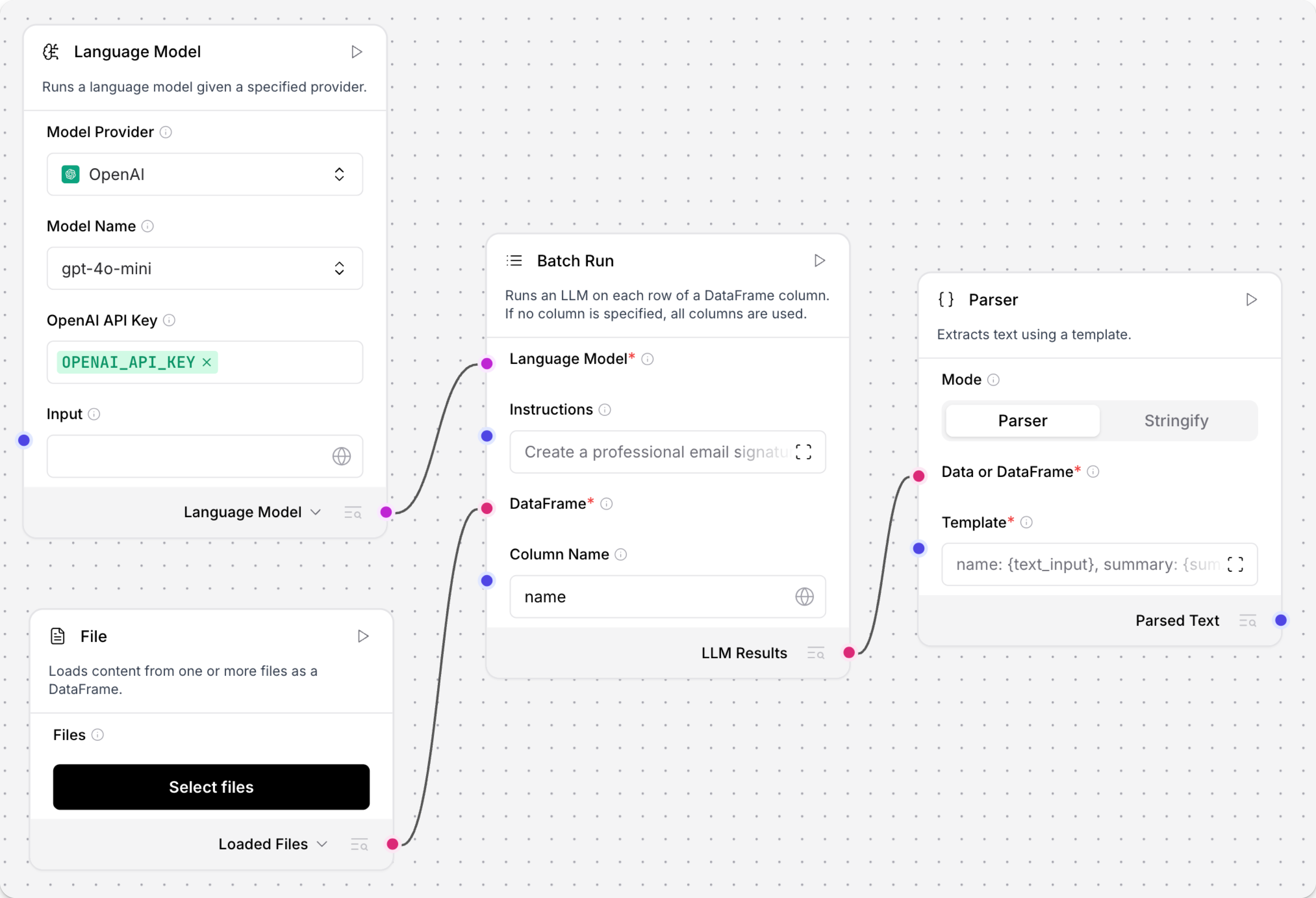
-
Connect any language model component to a Batch Run component's Language model port.
-
Connect
Tableoutput from another component to the Batch Run component's DataFrame input. For example, you could connect a Read File component with a CSV file. -
In the Batch Run component's Column Name field, enter the name of the column in the incoming
Tablethat contains the text to process. For example, if you want to extract text from anamecolumn in a CSV file, enternamein the Column Name field. -
Connect the Batch Run component's Batch Results output to a Parser component's DataFrame input.
-
Optional: In the Batch Run component menu, enable the System Message parameter, click Close, and then enter an instruction for how you want the LLM to process each cell extracted from the file. For example,
Create a business card for each name. -
In the Parser component's Template field, enter a template for processing the Batch Run component's new
Tablecolumns (text_input,model_response, andbatch_index):For example, this template uses three columns from the resulting, post-batch
Table:record_number: {batch_index}, name: {text_input}, summary: {model_response} -
To test the processing, click the Parser component, click Run component, and then click Inspect output to view the final
Table.You can also connect a Chat Output component to the Parser component if you want to see the output in the Playground.
Batch Run parameters
Some parameters are hidden by default in the visual editor. You can modify all component parameters through the component inspection panel that appears when you select a component.
| Name | Type | Description |
|---|---|---|
| model | HandleInput | Input parameter. Connect the 'Language Model' output from a language model component. Required. |
| system_message | MultilineInput | Input parameter. A multi-line system instruction for all rows in the DataFrame. |
| df | DataFrameInput | Input parameter. The DataFrame whose column is treated as text messages, as specified by 'column_name'. Required. |
| column_name | MessageTextInput | Input parameter. The name of the DataFrame column to treat as text messages. If empty, all columns are formatted in TOML. |
| output_column_name | MessageTextInput | Input parameter. Name of the column where the model's response is stored. Default=model_response. |
| enable_metadata | BoolInput | Input parameter. If True, add metadata to the output DataFrame. |
| batch_results | Table | Output parameter. A DataFrame with all original columns plus the model's response column. |
Was this page helpful?
