Structured Output
The Structured Output component uses an LLM to transform any input into structured data (JSON or Table) using natural language formatting instructions and an output schema definition.
For example, you can extract specific details from documents, like email messages or scientific papers.
Use the Structured Output component in a flow
If you're building an agentic flow, the Agent component includes a built-in Structured Response output that produces structured Data without a separate Structured Output component.
For more information, see Agent component output.
To use the Structured Output component in a flow, do the following:
-
Provide an Input Message, which is the source material from which you want to extract structured data. This can come from practically any component, but it is typically a Chat Input, Read File, or other component that provides some unstructured or semi-structured input.
tipNot all source material has to become structured output. The power of the Structured Output component is that you can specify the information you want to extract, even if that data isn't explicitly labeled or an exact keyword match. Then, the LLM can use your instructions to analyze the source material, extract the relevant data, and format it according to your specifications. Any irrelevant source material isn't included in the structured output.
-
Define Format Instructions and an Output Schema to specify the data to extract from the source material and how to structure it in the final
JSONorTableoutput.The instructions are a prompt that tell the LLM what data to extract, how to format it, how to handle exceptions, and any other instructions relevant to preparing the structured data.
The schema is a table that defines the fields (keys) and data types to organize the data extracted by the LLM into a structured
JSONorTableobject. For more information, see Output Schema options -
Attach a language model component that is set to emit
LanguageModeloutput.The LLM uses the Input Message and Format Instructions from the Structured Output component to extract specific pieces of data from the input text. The output schema is applied to the model's response to produce the final
JSONorTablestructured object. -
Optional: Typically, the structured output is passed to downstream components that use the extracted data for other processes, such as the Parser or Data Operations components.
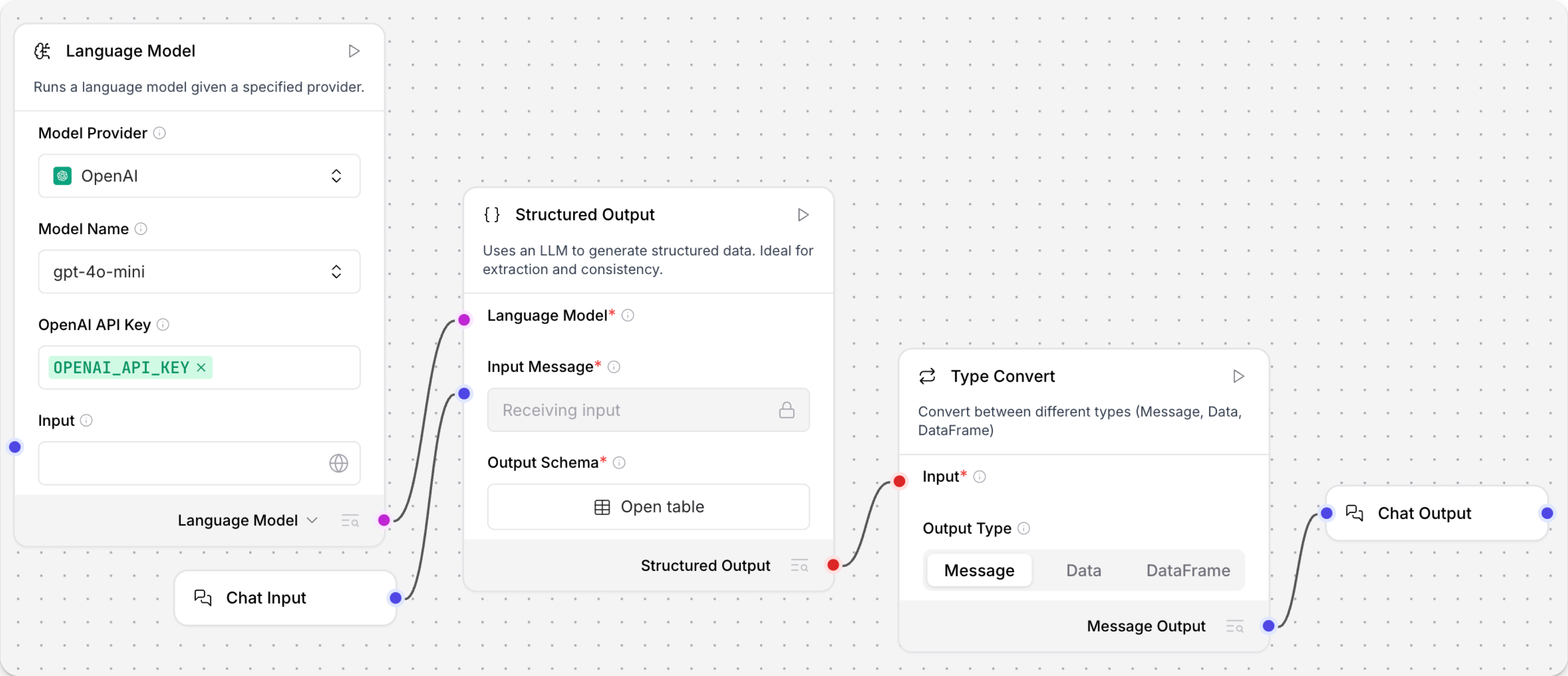
Structured Output example: Financial Report Parser template
The Financial Report Parser template provides an example of how the Structured Output component can be used to extract structured data from unstructured text.
The template's Structured Output component has the following configuration:
-
The Input Message comes from a Chat Input component that is preloaded with quotes from sample financial reports
-
The Format Instructions are as follows:
You are an AI that extracts structured JSON objects from unstructured text.
Use a predefined schema with expected types (str, int, float, bool, dict).
Extract ALL relevant instances that match the schema - if multiple patterns exist, capture them all.
Fill missing or ambiguous values with defaults: null for missing values.
Remove exact duplicates but keep variations that have different field values.
Always return valid JSON in the expected format, never throw errors.
If multiple objects can be extracted, return them all in the structured format. -
The Output Schema includes keys for
EBITDA,NET_INCOME, andGROSS_PROFIT.
The structured JSON object is passed to a Parser component that produces a text string by mapping the schema keys to variables in the parsing template:
EBITDA: {EBITDA} , Net Income: {NET_INCOME} , GROSS_PROFIT: {GROSS_PROFIT}
When printed to the Playground, the resulting Message replaces the variables with the actual values extracted by the Structured Output component. For example:
EBITDA: 900 million , Net Income: 500 million , GROSS_PROFIT: 1.2 billion
Structured Output parameters
Some parameters are hidden by default in the visual editor. You can modify all component parameters through the component inspection panel that appears when you select a component.
| Name | Type | Description |
|---|---|---|
Language Model (llm) | LanguageModel | Input parameter. The LanguageModel output from a Language Model component that defines the LLM to use to analyze, extract, and prepare the structured output. |
Input Message (input_value) | String | Input parameter. The input message containing source material for extraction. |
Format Instructions (system_prompt) | String | Input parameter. The instructions to the language model for extracting and formatting the output. |
Schema Name (schema_name) | String | Input parameter. An optional title for the Output Schema. |
Output Schema (output_schema) | Table | Input parameter. A table describing the schema of the desired structured output, ultimately determining the content of the JSON or Table output. See Output Schema options. |
Structured Output (structured_output) | JSON or Table | Output parameter. The final structured output produced by the component. Near the component's output port, you can select the output data type as either Structured Output Data or Structured Output DataFrame. The specific content and structure of the output depends on the input parameters. |
Output Schema options
After the LLM extracts the relevant data from the Input Message and Format Instructions, the data is organized according to the Output Schema.
The schema is a table that defines the fields (keys) and data types for the final JSON or Table output from the Structured Output component.
The default schema is a single field string.
To add a key to the schema, click Add a new row, and then edit each column to define the schema:
-
Name: The name of the output field. Typically a specific key for which you want to extract a value.
You can reference these keys as variables in downstream components, such as a Parser component's template. For example, the schema key
NET_INCOMEcould be referenced by the variable{NET_INCOME}. -
Description: An optional metadata description of the field's contents and purpose.
-
Type: The data type of the value stored in the field. Supported types are
str(default),int,float,bool, anddict. -
As List: Enable this setting if you want the field to contain a list of values rather than a single value.
For simple schemas, you might only extract a few string or int fields.
For more complex schemas with lists and dictionaries, it might help to refer to the JSON and Table structures and attributes, as described in Langflow data types.
You can also emit a rough JSON or Table, and then use downstream components for further refinement, such as a Data Operations component.
Was this page helpful?
