If-Else
The If-Else component is a conditional router that routes messages by comparing two strings.
It evaluates a condition by comparing two text inputs using the specified operator, and then routes the message to true_result or false_result depending on the evaluation.
The operator looks for single strings in the input (input_text) based on an operator and match text (match_text), but it can also search for multiple words by matching a regex.
Available operators include:
- equals: Exact match comparison
- not equals: Inverse of exact match
- contains: Checks if the
match_textis found withininput_text - starts with: Checks if
input_textbegins withmatch_text - ends with: Checks if
input_textends withmatch_text - regex: Matches on a case-sensitive pattern
By default, all operators are case insensitive except regex. regex is always case sensitive, and you can enable case sensitivity for all other operators in the If-Else parameters.
Use the If-Else component in a flow
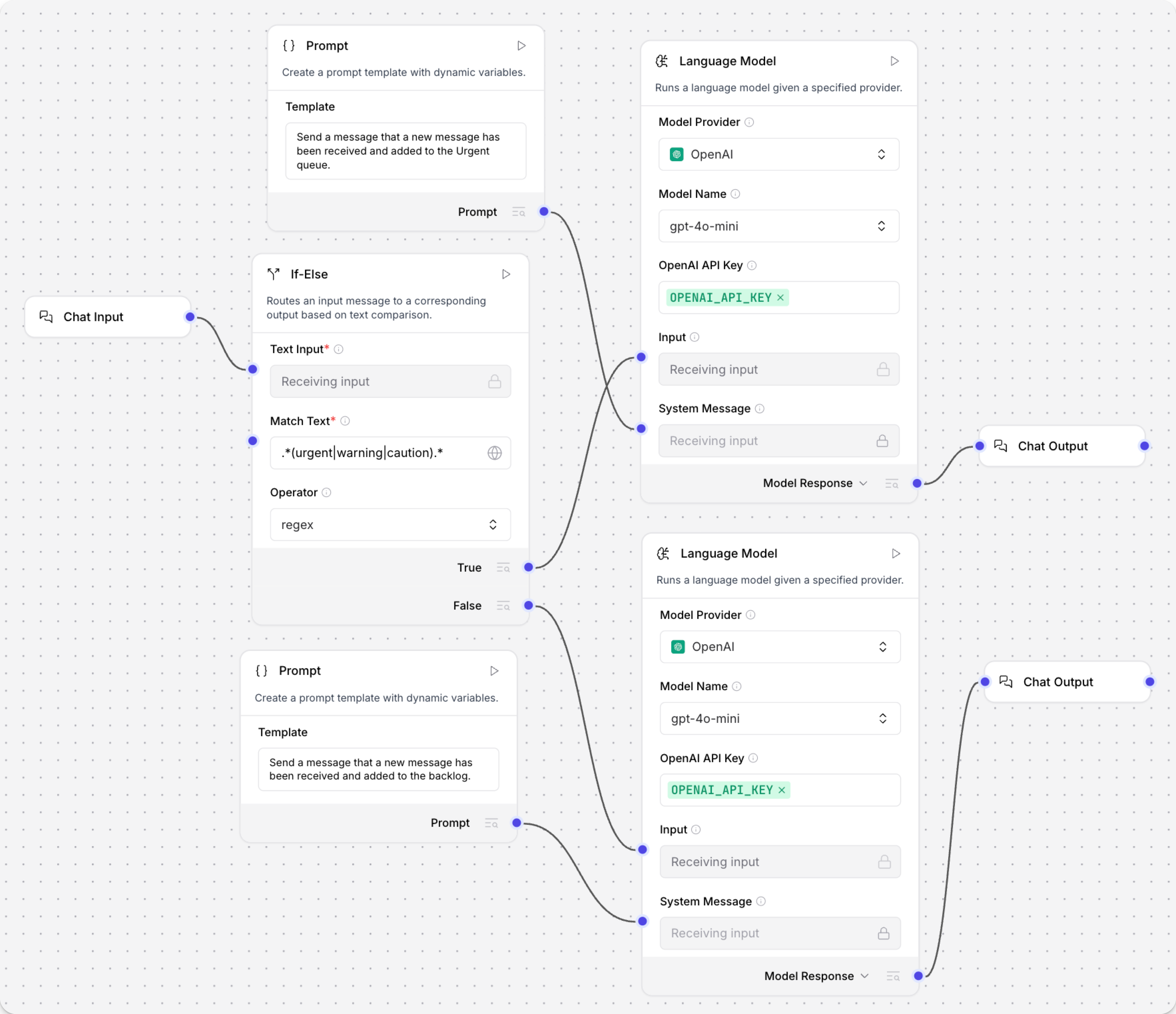
The following example uses the If-Else component to check incoming chat messages with regex matching, and then output a different response depending on whether the match evaluated to true or false.
-
Add an If-Else component to your flow, and then configure it as follows:
-
Text Input: Connect the Text Input port to a Chat Input component or another
Messageinput.If your input isn't in
Messageformat, you can use another component to transform it, such as the Type Convert component or Parser component. If your input isn't appropriate forMessageformat, consider using another component for conditional routing, such as the Data Operations component. -
Match Text: Enter
.*(urgent|warning|caution).*so the component looks for these values in incoming input. The regex match is case sensitive, so if you need to look for all permutations ofwarning, enterwarning|Warning|WARNING. -
Operator: Select regex.
-
Case True: In the component inspection panel, enable the Case True parameter, click Close, and then enter
New Message Detectedin the field.The Case True message is sent from the True output port when the match condition evaluates to true.
Case False is left blank, so when the condition evaluates to false the component routes the original Text Input to the False output port.
-
-
Depending on what you want to happen when the outcome is True, add components to your flow to execute that logic:
-
Add a Language Model, Prompt Template, and Chat Output component to your flow.
-
In the Language Model component, enter your OpenAI API key or select a different provider and model.
-
Connect the If-Else component's True output port to the Language Model component's Input port.
-
In the Prompt Template component, enter instructions for the model when the evaluation is true, such as
Send a message that a new warning, caution, or urgent message was received. -
Connect the Prompt Template component to the Language Model component's System Message port.
-
Connect the Language Model component's output to the Chat Output component.
-
-
Repeat the same process with another set of Language Model, Prompt Template, and Chat Output components for the False outcome.
Connect the If-Else component's False output port to the second Language Model component's Input port. In the second Prompt Template, enter instructions for the model when the evaluation is false, such as
Send a message that a new low-priority message was received. -
To test the flow, open the Playground, and then send the flow some messages with and without your regex strings. The chat output should reflect the instructions in your prompts based on the regex evaluation.
User: A new user was created.AI: A new low-priority message was received.User: Sign-in warning: new user locked out.AI: A new warning, caution, or urgent message was received. Please review it at your earliest convenience.
If-Else parameters
Some parameters are hidden by default in the visual editor. You can modify all component parameters through the component inspection panel that appears when you select a component.
| Name | Type | Description |
|---|---|---|
| input_text | String | Input parameter. The primary text input for the operation. |
| match_text | String | Input parameter. The text to compare against. |
| operator | Dropdown | Input parameter. The operator used to compare texts. Options include equals, not equals, contains, starts with, ends with, and regex. The default is equals. |
| case_sensitive | Boolean | Input parameter. When true, the comparison is case sensitive. The default is false. This setting doesn't apply to regex comparisons. |
| max_iterations | Integer | Input parameter. The maximum number of iterations allowed for the conditional router. The default is 10. |
| default_route | Dropdown | Input parameter. The route to take when max iterations are reached. Options include true_result or false_result. The default is false_result. |
| true_result | Message | Output parameter. The output produced when the condition is true. |
| false_result | Message | Output parameter. The output produced when the condition is false. |
Case True and Case False are optional override messages for the True and False output ports.
- When you set a value, that message is emitted on the matching branch.
- When you leave one blank, the component routes the original Text Input to that branch instead of emitting an empty message.
To emit something other than the input on a matched branch, set the corresponding Case message.
Was this page helpful?
