Web Search
The Web Search component consolidates the Web Search, News Search, and RSS Reader components into a single component with tabs for different search modes. You can search the web using DuckDuckGo, search Google News, or read RSS feeds, all from one component.
For other search APIs, see Bundles.
The Web Search component uses web scraping that can be subject to rate limits.
For production use, consider using another search component with more robust API support, such as provider-specific bundles.
Use the Web Search component in a flow
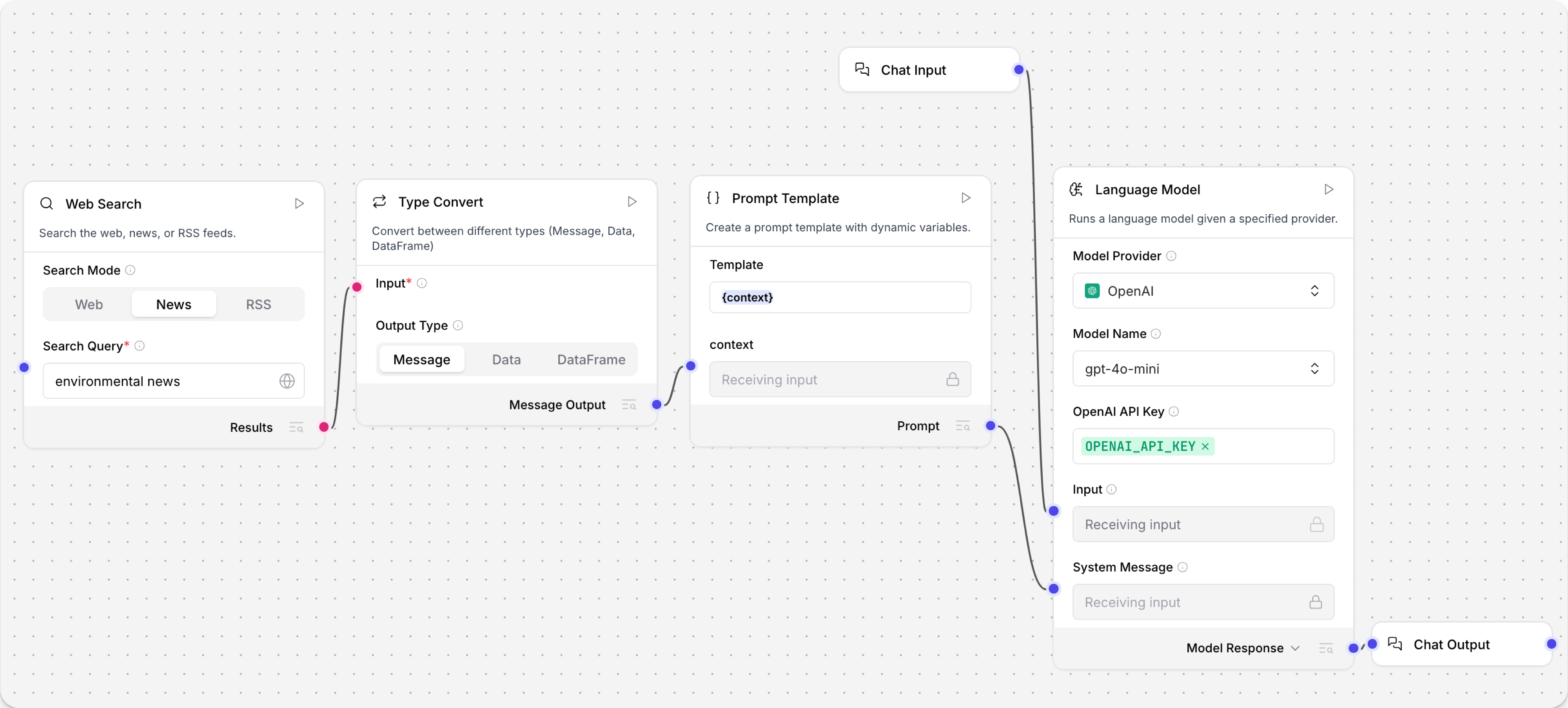
The following steps demonstrate one way that you can use a Web Search component in a flow:
-
Create a flow based on the Basic Prompting template.
-
Add a Web Search component, select your desired Search Mode (Web, News, or RSS), and then enter a search query or RSS feed URL.
-
Add a Type Convert component, set the Output Type to Message, and then connect the Web Search component's output to the Type Convert component's input.
By default, the Web Search component outputs a
Table. Because the Prompt Template component only acceptsMessagedata, this conversion is required so that the flow can pass the search results to the Prompt Template component. For more information, see Web Search output. -
In the Prompt Template component's Template field, add a variable like
{searchresults}or{context}.This adds a field to the Prompt Template component that you can use to pass the converted search results to the prompt. For more information, see Define variables in prompts.
-
Connect the Type Convert component's output to the new variable field on the Prompt Template component.
-
In the Language Model component, add your OpenAI API key, or select a different provider and model.
-
Click Playground, and then enter your query.
The LLM processes the request, including the context passed through the Prompt Template component, and then prints the response in the Playground chat interface.
Result
The following is an example of a possible response. Your response may vary based on the current state of the web, your specific query, the model, and other factors.
Here are some of the latest news articles related to the environment:Ozone Pollution and Global Warming: A recent study highlights that ozone pollution is a significant global environmental concern, threatening human health and crop production while exacerbating global warming. Read more...
Parameters
Some parameters are hidden by default in the visual editor. You can modify all component parameters through the component inspection panel that appears when you select a component.
- Web Search Mode
- News Search Mode
- RSS Reader Mode
| Name | Display Name | Info |
|---|---|---|
| search_mode | Search Mode | Input parameter. Choose search mode: Web (DuckDuckGo), News (Google News), or RSS (Feed Reader). Default: Web. |
| query | Search Query | Input parameter. Keywords to search for. |
| timeout | Timeout | Input parameter. Timeout for the web search request in seconds. Default: 5. |
| max_results | Max Results | Input parameter. Maximum number of results to return. Set to 0 to return every result. Default: 5. |
| max_content_length | Max Content Length | Input parameter. Maximum number of characters kept from each scraped page or feed field. Set to 0 to keep the full text. Default: 2000. |
| results | Results | Output parameter. Returns a Table containing title, link, snippet, and content. For more information, see Web Search output. |
| Name | Display Name | Info |
|---|---|---|
| search_mode | Search Mode | Input parameter. Choose search mode: Web (DuckDuckGo), News (Google News), or RSS (Feed Reader). Default: Web. |
| query | Search Query | Input parameter. Search keywords for news articles. |
| hl | Language (hl) | Input parameter. Language code, such as en-US, fr, de. Default: en-US. |
| gl | Country (gl) | Input parameter. Country code, such as US, FR, DE. Default: US. |
| ceid | Country:Language (ceid) | Input parameter. Language, such as US:en, FR:fr. Default: US:en. |
| topic | Topic | Input parameter. One of: WORLD, NATION, BUSINESS, TECHNOLOGY, ENTERTAINMENT, SCIENCE, SPORTS, HEALTH. |
| location | Location (Geo) | Input parameter. City, state, or country for location-based news. Leave blank for keyword search. |
| timeout | Timeout | Input parameter. Timeout for the request in seconds. Default: 5. |
| max_results | Max Results | Input parameter. Maximum number of articles to return. Set to 0 to return every article. Default: 5. |
| max_content_length | Max Content Length | Input parameter. Maximum number of characters kept from each article field. Set to 0 to keep the full text. Default: 2000. |
| results | Results | Output parameter. A Table with the key columns title, link, published and summary. For more information, see Web Search output. |
| Name | Display Name | Info |
|---|---|---|
| search_mode | Search Mode | Input parameter. Choose search mode: Web (DuckDuckGo), News (Google News), or RSS (Feed Reader). Default: Web. |
| query | RSS Feed URL | Input parameter. URL of the RSS feed to parse, such as https://rss.nytimes.com/services/xml/rss/nyt/HomePage.xml. |
| timeout | Timeout | Input parameter. Timeout for the RSS feed request in seconds. Default: 5. |
| max_results | Max Results | Input parameter. Maximum number of feed items to return. Set to 0 to return every item. Default: 5. |
| max_content_length | Max Content Length | Input parameter. Maximum number of characters kept from each feed field. Set to 0 to keep the full text. Default: 2000. |
| results | Results | Output parameter. A Table containing the key columns title, link, published and summary. For more information, see Web Search output. |
Web Search output
The Web Search component outputs a Table with different columns depending on the search mode.
- Web Search Mode
- News Search Mode
- RSS Reader Mode
When using Web search mode, the component returns a Table containing:
title: The title of the search resultlink: The URL of the search resultsnippet: A brief snippet from the search resultcontent: The text of the page (when successfully fetched), truncated to Max Content Length characters
In Web search mode, the component scrapes every result page it returns. When the component is connected to an Agent as a tool, the whole table is re-sent to the model on every turn, so a few searches can exceed the model's context window. Max Results and Max Content Length bound that payload; raise them only when the downstream consumer can absorb the extra tokens.
When using News search mode, the component returns a Table containing:
title: The title of the news article, truncated to Max Content Length characterslink: The URL of the news article, truncated to Max Content Length characterspublished: The publication date of the article, truncated to Max Content Length characterssummary: A summary or description of the article, truncated to Max Content Length characters
When using RSS search mode, the component returns a Table containing:
title: The title of the RSS feed item, truncated to Max Content Length characterslink: The URL of the RSS feed item, truncated to Max Content Length characterspublished: The publication date of the item, truncated to Max Content Length characterssummary: A summary or description of the item, truncated to Max Content Length characters
Was this page helpful?
