CUGA
These components require a torch opt-in install.
This provider is an extra of the lfx-bundles metapackage. It is opt-in for both Langflow and standalone LFX installs:
uv pip install "lfx-bundles[<bundle>]"
Replace <bundle> with this page's provider name, for example qdrant.
For a torch-free full Langflow install, run uv pip install "langflow[bundles]".
For standalone LFX with every provider in lfx-bundles, including PyTorch-based providers, run uv pip install "lfx[bundles]".
See Additional bundles for the exact extra name.
Bundles contain custom components that support specific third-party integrations with Langflow.
The CUGA component only supports OpenAI and watsonx models. To use other model providers, use the core Agent component instead.
The CUGA (ConfigUrable Generalist Agent) component is an advanced AI agent that executes complex tasks using tools, optional browser automation, and structured output generation.
The CUGA component can be used in flows in place of an Agent component. Like the core Agent component, the CUGA component can use tools connected to its Tools port, and can be used as a tool itself. It also includes some additional features:
- Browser automation for web scraping with Playwright.
To enable web scraping, set the component's
browser_enabledparameter totrue. - Load custom instructions for the agent to execute. To use this feature, use the component's Instructions input to attach markdown files containing agent instructions.
For more information, see the CUGA project repository.
Use the CUGA component in a flow
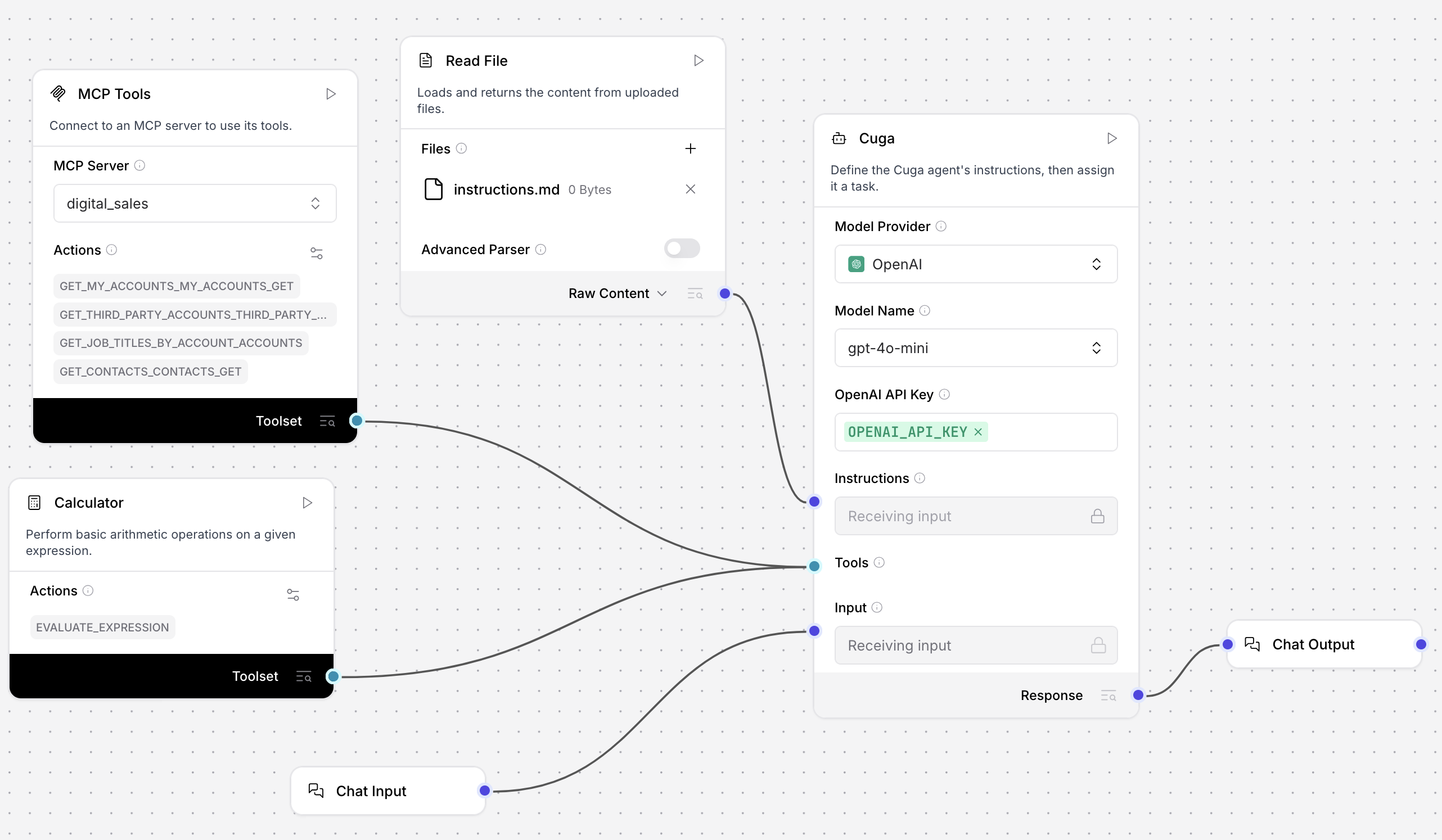
For demonstration purposes, the following example modifies a template flow to use the CUGA component.
-
Create a flow based on the Simple Agent template, and then replace the Agent component with the CUGA component.
-
Connect an MCP Tools component and a Calculator component to the CUGA component's Tools port, and then connect the MCP Tools component to any MCP server. This example connects to a server containing sales data for a business organization.
-
Add a Read File component, and then connect it to the CUGA component's Instructions port. Alternatively, click Edit text to open the Edit text content pane, and enter your instructions directly into the CUGA component.
-
Create a Markdown file on your computer called
instructions.md, and then insert the following content. It's important to clearly format the document with## Planand## Answerfor the agent to understand your instructions.## Plan- Break down complex queries into subtasks- Prioritize information gathering before execution- Consider dependencies between actions- Validate intermediate results before proceeding## Answer- Provide concise summaries with key findings- Include relevant data points and metrics- Cite sources when using MCP tool results- Use clear structure and formatting for readability -
In the Read File component, click Add File, and then attach your
instructions.mdfile. -
Open the Playground, and then ask the agent a question that could use your connected MCP server. This example asked about the sales data provided by the MCP Server, such as
Which accounts are available?. The agent describes the tool calls it makes and then returns an answer according to the instructions. For example, the list of available accounts is very large, but the CUGA component returns a concise summary as requested in the policy.Based on the available data, here are the accounts:Summit Solutions (NY) - Revenue: $1,200,000Pacific Ventures (CA) - Revenue: $9,500,000Lone Star Corp (TX) - Revenue: $4,500,000Mountain Peak Systems (CO) - Revenue: $2,100,000Digital Dynamics (CA) - Revenue: $5,500,000Cascade Computing (WA) - Revenue: $4,300,000Data Flow Systems (CA) - Revenue: $8,900,000Rocky Mountain Enterprises (CO) - Revenue: $3,200,000Blue Sky Partners (TX) - Revenue: $500,000Liberty Manufacturing (PA) - Revenue: $3,400,000This is a partial list; there are more accounts available. The total revenue across all accounts is $210,200,000.
CUGA parameters
Some parameters are hidden by default in the visual editor. You can modify all component parameters through the component inspection panel that appears when you select a component.
| Name | Type | Description |
|---|---|---|
| agent_llm | Dropdown | Model provider for the agent. |
| instructions | Multiline String | Custom instructions that define the agent's planning and answers. Can be provided directly or through Markdown files. Formatting is important in order for the agent to understand the instructions. See Use the CUGA component in a flow. |
| n_messages | Integer | Number of chat history messages to retrieve. Useful for maintaining context in ongoing conversations identified by session_id. Default: 100. |
| format_instructions | Multiline String | Template for structured output. |
| output_schema | Table | When output_schema is provided, structured responses are validated against a dynamically built schema. Invalid items are returned alongside validation errors. Fields: name, description, type (str, int, float, bool, dict), multiple (as list). |
| add_current_date_tool | Boolean | If true, adds a tool that returns the current date. Default: true. |
| lite_mode | Boolean | Set to true to enable CugaLite mode for faster execution when using a smaller number of tools. Default: true. |
| lite_mode_tool_threshold | Integer | The threshold to automatically enable CugaLite. If the CUGA component has fewer tools connected than this threshold, CugaLite is activated. Default: 25. |
| shortlisting_tool_threshold | Integer | The threshold for tool shortlisting. When the total number of tools exceeds this threshold, the CUGA component enables its find_tools feature to filter tools down to a smaller subset before making tool selection decisions. This helps reduce token usage and improve performance when working with large numbers of tools. Default: 35. |
| decomposition_strategy | Dropdown | Strategy for task decomposition. flexible allows multiple subtasks per app. exact enforces one subtask per app. Default: flexible. |
| browser_enabled | Boolean | Enable a built-in browser for web scraping and search. Allows the agent to use general web search in its responses. Disable (false) to restrict the agent to the context provided in the flow. Default: false. |
Was this page helpful?
